A theme for shadcn/ui installs with one line, and that line edits your project. Most people run it, see the colors change, and never find out what else moved. Then a later install does something odd, and there is no way to tell which command did it.
This guide runs the command on a fresh project under git and reads everything it changed. The theme is Kiln, one of the themes on this site. The project is a new shadcn project on Vite with Tailwind 4 and shadcn 4.23.0. The same steps work for any theme that is served as a shadcn registry item, which is a JSON file the shadcn command line tool turns into changes in your project.
1. Start from a clean commit
The command writes into files you already have, so make sure git can show you the difference. The project we started from was already a git repository with one commit. Commit whatever is open:
git add -A && git commit -m "Before the theme"
To see the theme on something, we put stock components on the page first: three buttons, two cards, an input and three badges. button came with the project; the rest came from shadcn's own registry:
npx shadcn@latest add card input badge
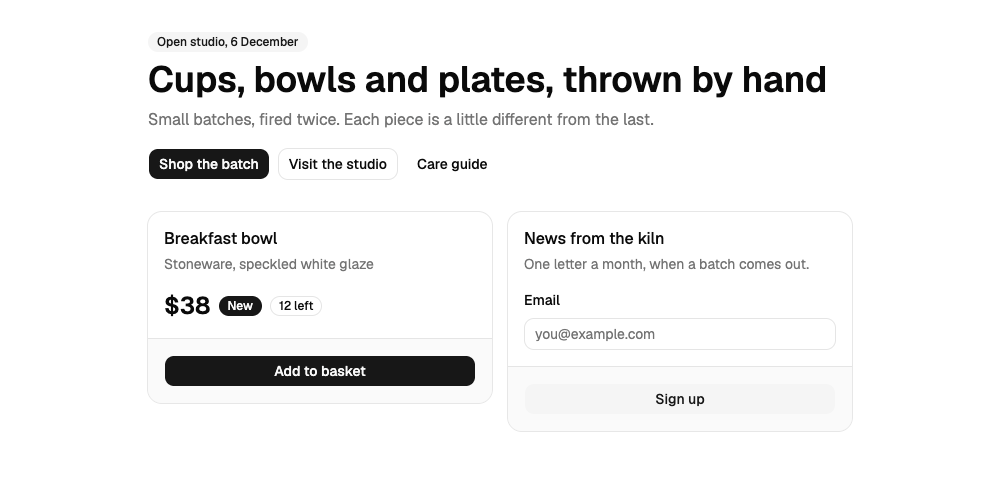
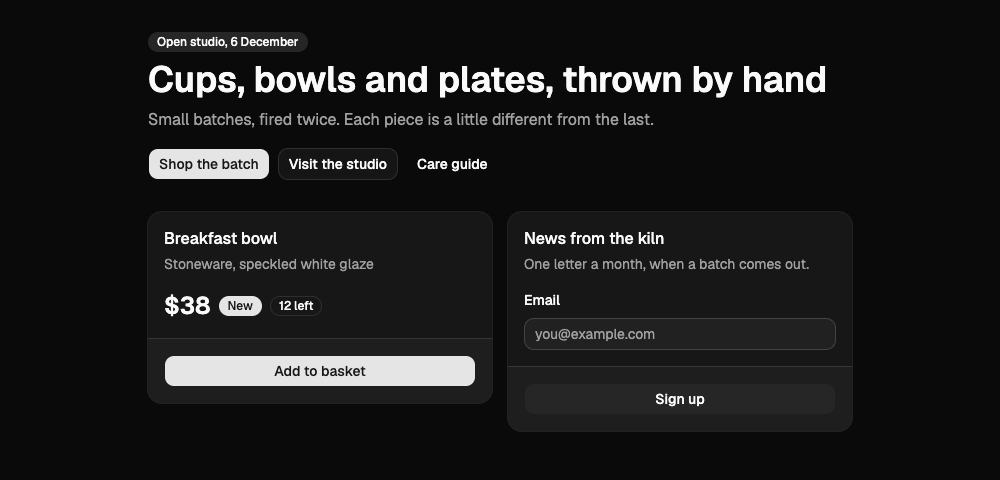
2. Run the theme's command
Each theme page on this site shows its command. For Kiln:
npx shadcn@latest add https://strictthemes.com/r/kiln.json
The tool stops and asks first:
? You are about to install a new theme.
Existing CSS variables and components will be overwritten. Continue? › (y/N)
Answer yes, or pass --yes when a coding agent runs it, because an agent cannot answer the question. This is what it printed after that:
✔ Checking registry.
✔ Installing dependencies.
✔ Updating src/index.css
Kiln adds type classes: text-display, text-h1, text-h2, text-body, text-label.
shadcn's cn() takes them for colors and drops them next to a text color. To fix
that, set lib/utils.ts to the code below, and in components/ui import cn from
that file instead of from "cn":
...
Kiln brings its own fonts. If your global CSS still imports another font (a new
shadcn project imports Geist), remove that import and its package unless you use
the font elsewhere.
Read the notes at the end. They are the theme's own instructions, and step 4 comes back to them.
3. See what changed
git status --short
git diff --stat
 M package-lock.json
 M package.json
 M src/index.css

 package-lock.json |  30 +++++++++
 package.json      |   3 +
 src/index.css     | 190 +++++++++++++++++++++++++++++++++++-------------------
 3 files changed, 155 insertions(+), 68 deletions(-)
Three files. No component was touched, and no new file was written.
package.json: three font packages
+    "@fontsource-variable/bricolage-grotesque": "^5.3.0",
+    "@fontsource-variable/dm-sans": "^5.3.0",
     "@fontsource-variable/geist": "^5.3.0",
+    "@fontsource/dm-mono": "^5.3.0",
The fonts are npm packages that carry the font files, so the site serves them itself and calls no font service. Geist stays: the command adds and does not remove.
src/index.css: everything else
The 190 changed lines fall into five groups.
 @import "@fontsource-variable/geist";
+@import "@fontsource/dm-mono/500.css";
+@import "@fontsource-variable/dm-sans";
+@import "@fontsource/dm-mono";
+@import "@fontsource-variable/bricolage-grotesque";
...
 @theme inline {
-    --font-heading: var(--font-sans);
-    --font-sans: 'Geist Variable', sans-serif;
+    --font-heading: 'Bricolage Grotesque Variable', sans-serif;
+    --font-sans: 'DM Sans Variable', sans-serif;
...
-    --radius-sm: calc(var(--radius) * 0.6);
+    --radius-sm: 2px;
...
+    --text-h1: 38px;
+    --text-h1--line-height: 1.1;
+    --text-h1--font-weight: 700;
...
 :root {
-    --background: oklch(1 0 0);
-    --primary: oklch(0.205 0 0);
+    --background: #F4ECE1;
+    --primary: #963614;
...
 .dark {
-    --primary: oklch(0.922 0 0);
+    --primary: #EC8B5E;
| Group | What the command did |
|---|---|
| Font imports | Added four @import lines. |
| Font variables | Pointed --font-sans and --font-heading at the new fonts and added --font-mono. |
| Corners | Replaced three computed radii with fixed ones (2px, 4px, 10px) and set --radius to 4px. |
| Type scale | Added five text sizes, each with its line height, weight and letter spacing. They become the classes text-display, text-h1, text-h2, text-body and text-label. |
| Colors | Replaced every color variable under :root (light) and .dark, and added four new pairs such as --success and --tertiary. |
It also added two base rules at the end of the file: headings use the heading font, and code, kbd, pre and samp use the mono font.
Where those lines come from
Open the address from the command in a browser. The whole theme is one JSON file of about 5 KB. Its parts map onto the diff:
Field in kiln.json |
What it holds | Where it went |
|---|---|---|
type |
registry:theme. This is why the tool asked before overwriting. |
|
cssVars.theme |
30 entries: the type scale, three radii, the names of the extra colors | the @theme inline block |
cssVars.light |
40 variables | :root |
cssVars.dark |
39 variables (the same list without radius) |
.dark |
registryDependencies |
Three more registry addresses, one for each font | fetched and applied too |
dependencies |
@fontsource/dm-mono |
package.json |
css |
One extra import, the 500 weight of the mono font | top of index.css |
docs |
The notes printed at the end | the terminal only |
Each font is its own small item of type registry:font. It names the npm package, the CSS variable to set (--font-sans) and the font family. That is how one theme command installs three packages it never mentions.
What is not in the file matters as well. The registry item has no files list, so the command does not write a DESIGN.md. The theme's rules and prose live in that file, and you fetch it yourself in step 5.
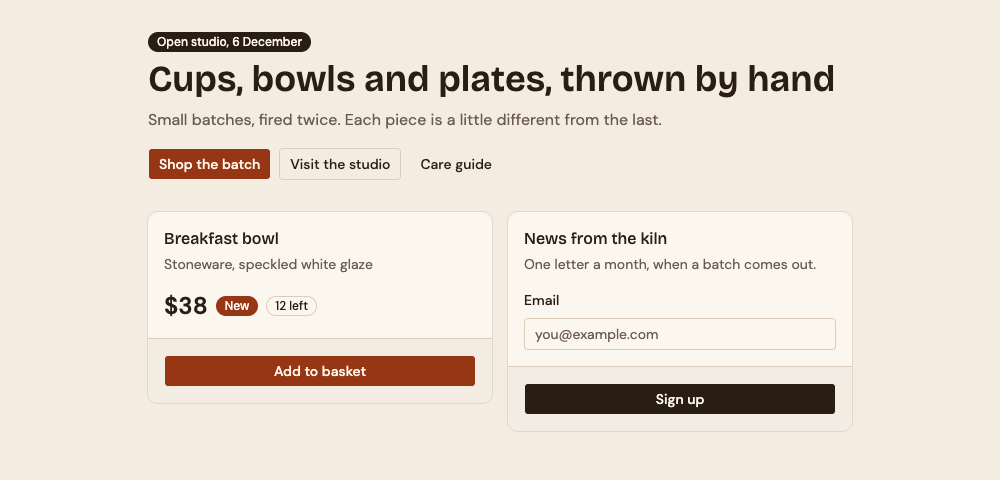
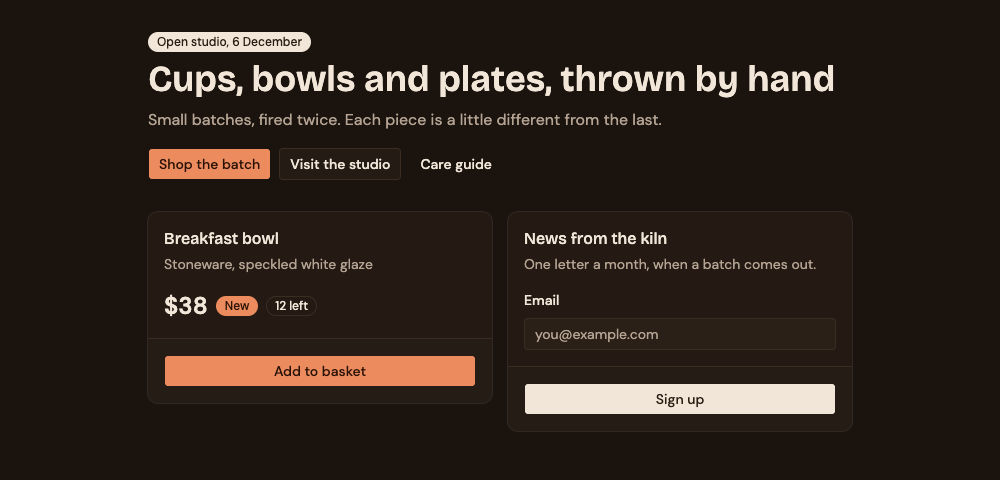
4. Build a page with it
The page above changed color without a single edit, because stock components ask for roles (bg-primary, text-muted-foreground) and the command changed what the roles mean. But the page was written before the theme existed, so it still uses sizes and gaps the theme does not have.
Do two things, both from the notes the command printed:
- Replace
src/lib/utils.tswith thecn()from the notes, and changeimport { cn } from "cn"toimport { cn } from "@/lib/utils"in the files undersrc/components/ui. Without this, a class such astext-bodyis dropped when it sits next to a text color. - Use the theme's type classes and spacing steps on the page:
text-h1in place oftext-4xl font-semibold,p-6in place ofp-8.
5. Check it
Strict Check compares a project with a theme's DESIGN.md. Fetch the file, build, and run:
curl -o DESIGN.md https://strictthemes.com/themes/kiln/DESIGN.md
npm run build
npx -y @strictthemes/check@0.7.1 --dist dist
On the page straight after the install, before step 4, it printed this (shortened):
Strict Check: Kiln

Source code
  spacing          9 checked  2 off
  typography       6 checked  3 off

Rendered pages: / in light and dark mode at 1280px and 375px, also on hover and focus
  colors         270 checked  all on theme
  spacing         52 checked  24 off
  typography     332 checked  80 off
  corners         88 checked  all on theme
  contrast       108 checked  all on theme
  ...

Errors in the source (5)
  spacing-off-scale
    `p-8` is 32px, which is not on the spacing scale (0, 1, 2, 4, 8, 16, 24, 40, 80px).
    src/App.tsx:15
  type-off-scale
    `text-4xl` is not in the type scale. Use one of `text-display`, `text-h1`, `text-h2`, `text-body`, `text-label`.
    src/App.tsx:18
  ...

Errors on the rendered pages (5)
  type-off-scale  ×19
    Text is 14px, which is not in the type scale (12, 16, 24, 38, 60px).
    button.group/button.inline-flex.shrink-0 "Shop the batch"; ...  [light, dark; 1280px, 375px]
  horizontal-scroll
    The page scrolls sideways: its content is 387px wide in a 375px window.
    button.group/button.inline-flex.shrink-0 "Care guide"  [light, dark; 375px]
  ...

Failed: 89.3% of 1041 measured values follow the theme. 10 errors, 1 warning.
The report splits cleanly. Colors, corners and contrast are all on theme: that is what the command changed. Spacing and type are off: that is what it cannot change, because those live in the page and in the stock components, where a button's text is 14px.
After the two changes in step 4, plus flex-wrap on the row of buttons for the phone width:
Passed: 100% of 1058 measured values follow the theme. 0 errors, 0 warnings.
The stock buttons took a className="text-body" each. It took one round of fixes to get from the first report to the second.
Where this goes wrong
A block without its theme
A block is a ready-made page or section from the same registry. It is tempting to install just the block:
npx shadcn@latest add https://strictthemes.com/r/kiln-shop.json
We did, on a fresh copy. The command created three files and updated two, all under src/components and src/lib. src/index.css was not in git status at all. The block does not name its theme as a dependency, so the page arrived without its colors, fonts or type classes:
There is a reason the block does not simply depend on the theme. We tested that with a local registry item that lists kiln.json under registryDependencies. The diff of src/index.css was 54 insertions and no deletions: the tool added the fonts, the type scale and the new color variables, and left every existing variable alone. --primary was still shadcn's stock black. A theme pulled in as a dependency only fills in what is missing.
So name the theme yourself, first, and the block second, in one command:
npx shadcn@latest add https://strictthemes.com/r/kiln.json https://strictthemes.com/r/kiln-shop.json
In our run with shadcn 4.23.0 the reverse order gave the same index.css, and so did installing the theme afterwards. Theme first is the order the registry's own notes give, and it is the one to hand to an agent.
Other things to know
- Your own color edits are replaced. The command rewrites every standard variable under
:rootand.dark. Commit first. - Geist is still imported. Remove the
@import "@fontsource-variable/geist"line and the package if nothing else uses it. --yesis needed without a keyboard. Run by a script, the command waited at the question and changed nothing.
Undo it
Nothing the command did is outside git and node_modules:
git restore .
git clean -fd
npm install
git restore puts back the three changed files, git clean -fd removes new files a block added, and npm install removes the font packages again. We ran this after a theme and block install: git status came back empty and only Geist was left in the font folders.
Next
- shadcn blocks and registries explained: what the JSON items are and how the tool resolves them.
- Dark mode with tokens in Tailwind 4: why the
:rootand.darkblocks in the diff are all a dark mode needs. - The themes: each page shows its install command.