npx shadcn@latest add followed by a web address is now a common way to hand someone a button, a whole page or a color theme. It looks like installing a package. It is not: nothing is added to node_modules for the component itself, and there is no version to update later. The command copies source code into your project and leaves.
Knowing what it copies, and from where, tells you what to expect from any "shadcn block" you find, and what a coding agent can do with one. This guide takes one live registry apart: the one on this site, read on 13 November 2026 with shadcn 4.23.0.
What a registry is
A registry is a set of JSON files served over HTTP. Each file is one item: a name, a type, and what to put into a project. The shadcn command line tool (the CLI) fetches an item, fetches whatever it depends on, and writes the result into your files.
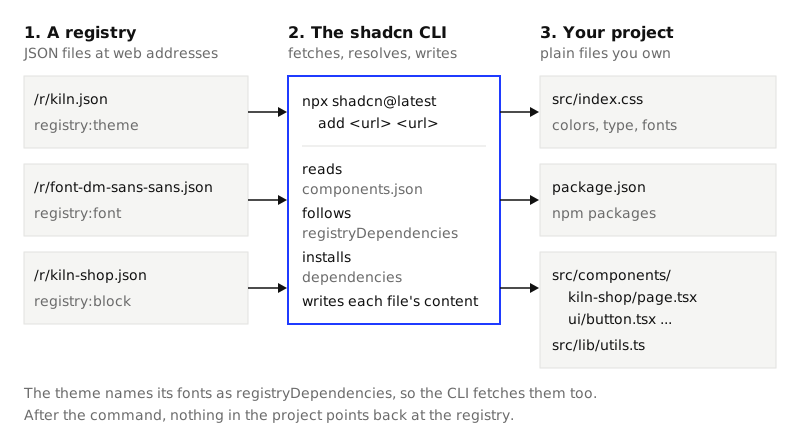
There is no server logic behind it. This site's registry is static files: https://strictthemes.com/r/registry.json is the index, and https://strictthemes.com/r/<name>.json is one item. You can open either in a browser.
The kinds of item
Every item has a type. The schema that ships inside the shadcn package (node_modules/shadcn/dist/schema) allows fourteen: registry:lib, block, component, ui, hook, page, file, theme, style, item, base, font, example and internal. A registry uses the few it needs. This one uses four at the top level:
| Type | Items here | What one is | What installing it changes |
|---|---|---|---|
registry:theme |
23 | Colors for light and dark, a type scale, corner sizes | Your global CSS file and package.json |
registry:font |
69 | One font and the CSS variable it fills, such as --font-sans |
Your global CSS file and package.json |
registry:block |
138 | Several files that make a page or a set: 115 pages and 23 bundles of the agent kit | New files, and it may overwrite stock components |
registry:component |
92 | One file with one component: the four agent kit pieces, written out for each of the 23 themes | One new file |
That is 322 items. We counted them with a short script that reads registry.json and groups by type. Every item, and the index itself, passed the package's own registryItemSchema and registrySchema.
Three more types appear one level down, on the files inside items: registry:ui (330 files), registry:component (303) and registry:lib (114). A file's type tells the CLI which of your folders it belongs in.
Component, block, theme
The three words get mixed up, so here is the difference in what you receive:
- A component is one piece you place yourself: a button, a tool-call row. You import it and pass it props.
- A block is a composition that already made the layout decisions: a pricing page, a shop home. It comes with the stock components it uses, sometimes adjusted. You render it and replace its sample content.
- A theme has no components at all. It is values: what
primaryis, how bigtext-h1is. Components and blocks ask for those values by name, which is why one block can look right in one theme and wrong in another.
Anatomy of one block
https://strictthemes.com/r/kiln-shop.json is the storefront page of the Kiln theme. Its fields:
{
  "name": "kiln-shop",
  "type": "registry:block",
  "title": "Kiln: Shop home",
  "dependencies": ["@base-ui/react", "class-variance-authority", "cn", "lucide-react"],
  "files": [ ... ],
  "docs": "This page needs the Kiln theme. In a project that does not have it yet, install both with one command: ..."
}
dependencies are npm packages. The CLI installs them. docs is plain text that the CLI prints after the install: read it, because it is the only place an author can tell you what to do next.
files is the code itself. Each entry has a path, a type, a target and the whole file as a string in content. This block has five:
| File in the item | Type | Lines | Where it landed |
|---|---|---|---|
components/kiln-shop/page.tsx |
registry:component |
558 | src/components/kiln-shop/page.tsx (new) |
components/ui/badge.tsx |
registry:ui |
52 | src/components/ui/badge.tsx (new) |
components/ui/input.tsx |
registry:ui |
20 | src/components/ui/input.tsx (new) |
components/ui/button.tsx |
registry:ui |
58 | src/components/ui/button.tsx (overwritten) |
lib/utils.ts |
registry:lib |
11 | src/lib/utils.ts (overwritten) |
The right-hand column is what happened in a new Vite project, where components.json maps @/components to src/components. That file is how the CLI knows your folders: it holds the aliases, the path of your global CSS and the style of stock component you chose.
Across the 115 page blocks in this registry, the number of files runs from 1 to 10, with a median of 5. button.tsx comes with 109 of them, badge.tsx with 59, input.tsx with 39 and select.tsx with 26. So expect a block to replace stock components you already have. The CLI asks first ("The file button.tsx already exists. Would you like to overwrite?"), and --overwrite says yes in advance. Pass it when an agent runs the command: with nobody to answer, our run stopped at that question after writing two of the five files.
registryDependencies
dependencies point at npm. registryDependencies point at other registry items, by name or by address. The Kiln theme has three:
"registryDependencies": [
  "https://strictthemes.com/r/font-dm-sans-sans.json",
  "https://strictthemes.com/r/font-dm-mono-mono.json",
  "https://strictthemes.com/r/font-bricolage-grotesque-heading.json"
]
Each is a small registry:font item: the font family, the npm package that carries the font files, and the variable to set. In this registry only the 23 themes have registryDependencies, three fonts each. No block lists its theme.
That last fact is deliberate, and it is the main thing to know before installing a block from here. We made a local test item that lists kiln.json as a registry dependency and installed it. The CLI added the theme's fonts, type scale and new variables to src/index.css, 54 lines in, none out, and left every existing color as it was. --primary was still the stock black. A theme that arrives as a dependency fills gaps and overwrites nothing; a theme you name in the command replaces the colors. So the command names both.
A real install
In a new shadcn project:
npx shadcn@latest add https://strictthemes.com/r/kiln.json https://strictthemes.com/r/kiln-shop.json --yes --overwrite
✔ Checking registry.
✔ Installing dependencies.
✔ Created 3 files:
  - src/components/kiln-shop/page.tsx
  - src/components/ui/badge.tsx
  - src/components/ui/input.tsx
ℹ Updated 2 files:
  - src/components/ui/button.tsx
  - src/lib/utils.ts
✔ Updating src/index.css
Then the docs of both items. git diff --stat for the files that already existed:
 package-lock.json            |  30 +++++++
 package.json                 |   3 +
 src/components/ui/button.tsx |   8 +-
 src/index.css                | 190 +++++++++++++++++++++++++++----------------
 src/lib/utils.ts             |  11 ++-
 5 files changed, 169 insertions(+), 73 deletions(-)
The block is a page, and the CLI does not wire it into the app. That is your one line, in src/App.tsx:
import ShopPage from "@/components/kiln-shop/page"

export function App() {
  return <ShopPage />
}

export default App
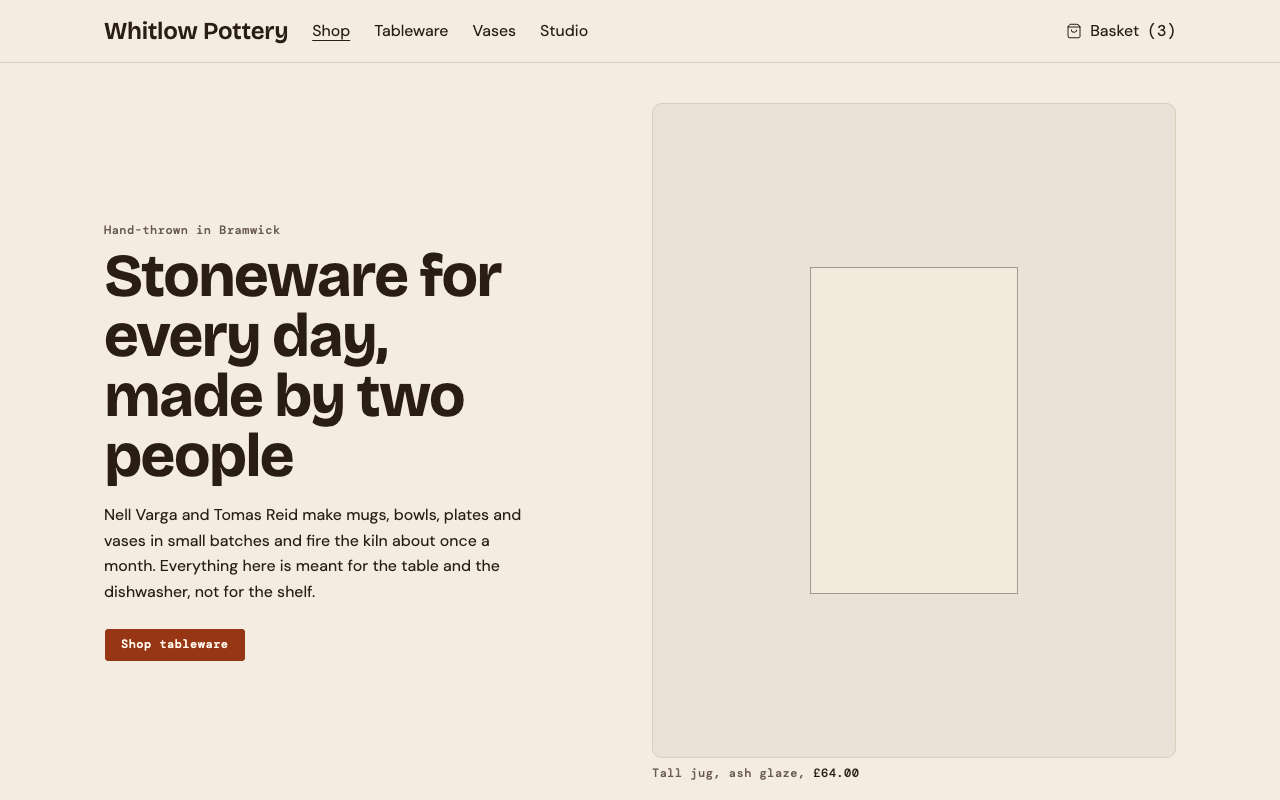
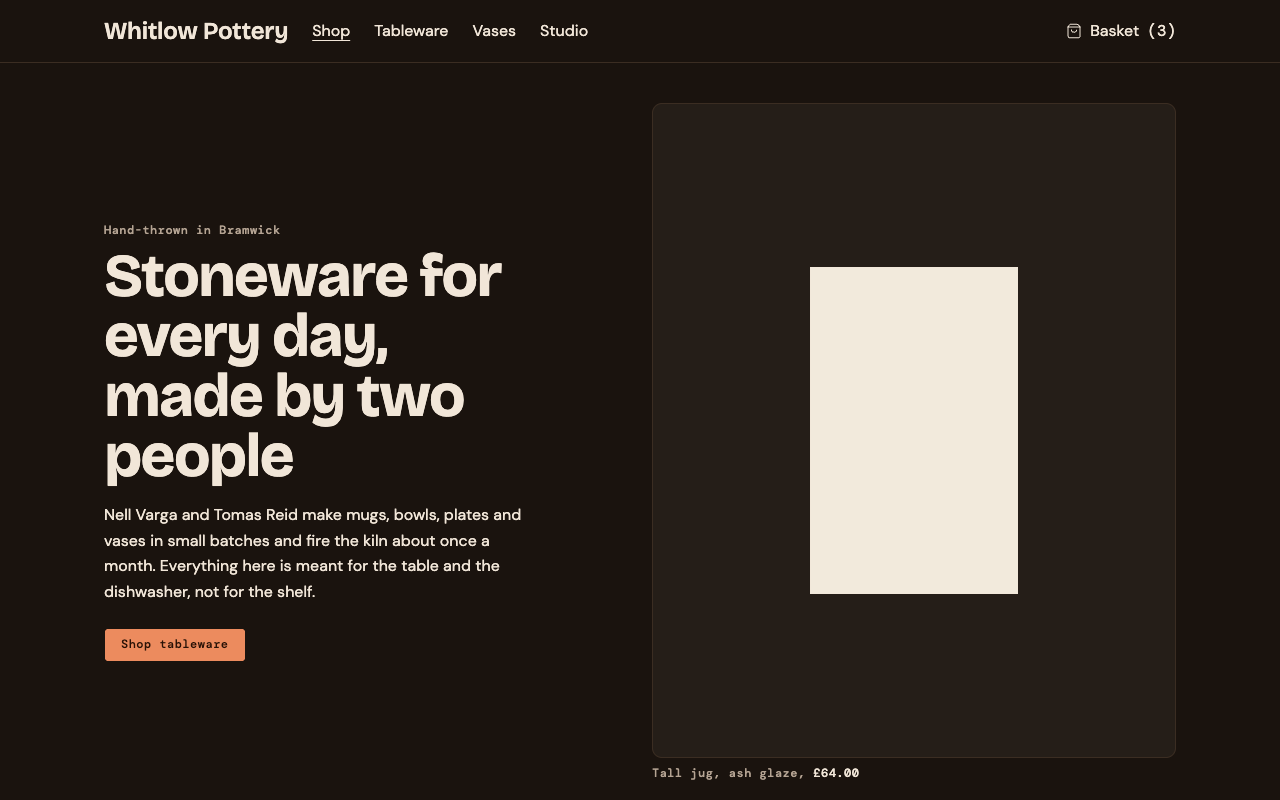
We then fetched the theme's DESIGN.md into the project root, built it, and ran Strict Check, which measures the rendered page against the theme:
npx -y @strictthemes/check@0.7.1 --dist dist
...
Rendered pages: / in light and dark mode at 1280px and 375px, also on hover and focus
  colors         834 checked  all on theme
  spacing        524 checked  all on theme
  typography    1734 checked  all on theme
  corners        122 checked  all on theme
  contrast       362 checked  all on theme
  tells          370 checked  all on theme
  layout           4 checked  all on theme
  states          90 checked  all on theme

Passed: 100% of 4143 measured values follow the theme. 0 errors, 0 warnings.
That is the block untouched, with its made-up sample content. It says nothing about the page after you put your own content in: run it again then.
Reading a registry without the CLI
A coding agent does not need the CLI to find out what exists. Three read-only routes, from lightest to fullest:
| Route | What it gives | Good for |
|---|---|---|
/llms.txt |
A plain text index: each theme with its DESIGN.md, install command, skill and page prompts |
An agent that can fetch one URL |
/themes.json |
The same as JSON: 23 themes, each with slug, fonts, spec, install, exports, skill, kit and prompts |
A script |
https://mcp.strictthemes.com/mcp |
An MCP server (a standard way to give an agent tools) with four tools | An agent in an editor |
The four tools, as the server lists them:
| Tool | What it does |
|---|---|
list_themes |
Names every theme: its slug, what kind of site it suits, its fonts and the pages it has prompts for. |
get_theme |
Returns one theme: the install command, what to do after it, and the whole DESIGN.md. |
list_prompts |
Says what each page prompt builds, for one theme or all. |
get_prompt |
Returns one page prompt word for word. |
All four only read. To connect a client that takes an address:
{
  "mcpServers": {
    "strict-themes": { "type": "http", "url": "https://mcp.strictthemes.com/mcp" }
  }
}
The registry index is useful to an agent too. registry.json lists every item with its file paths and docs but without the code, so it can pick an item first and fetch only that one.
Making an item of your own
An item can live in a local file. This one is valid against the package's schema, and npx shadcn@latest add ./registry/price-tag.json created src/components/price-tag.tsx from it:
{
  "$schema": "https://ui.shadcn.com/schema/registry-item.json",
  "name": "price-tag",
  "type": "registry:block",
  "title": "Price tag",
  "dependencies": ["lucide-react"],
  "files": [
    {
      "path": "components/price-tag.tsx",
      "type": "registry:component",
      "target": "components/price-tag.tsx",
      "content": "import { Tag } from \"lucide-react\"\n\nexport function PriceTag(...) { ... }\n"
    }
  ]
}
The content above is shortened; in the real file it is the whole component as one string. Put the file on any static host and the same command works with its address.
What a registry does not do
- No updates. The code is yours after the command. If the registry improves a block, nothing tells you, and running
addagain overwrites your edits. - No isolation. A block that brings
button.tsxchanges every button in your project. Look atgit diffbefore you commit. - No guarantee of fit. A block is written for one set of tokens. In a project with other colors or another type scale it renders, but wrong.
- Trust is on you. An item is code from a web address, plus npm packages to install. Read
filesanddependenciesof anything from a registry you do not know.
Next
- Install a shadcn theme, and what the command changes: the same command, read as a diff, with the block-without-theme failure shown.
- The agent kit: the four
registry:componentitems, in every theme. - Design tokens for coding agents: why a block asks for
primaryand not for a hex value.