A project that is built with a coding agent collects instruction files. There is one the agent always reads, a folder of editor rules, a folder of skills, and now a DESIGN.md. They overlap, so design rules get pasted wherever the developer happened to be: eight hex values in the instruction file, a spacing scale in an editor rule, a paragraph about buttons in a skill.
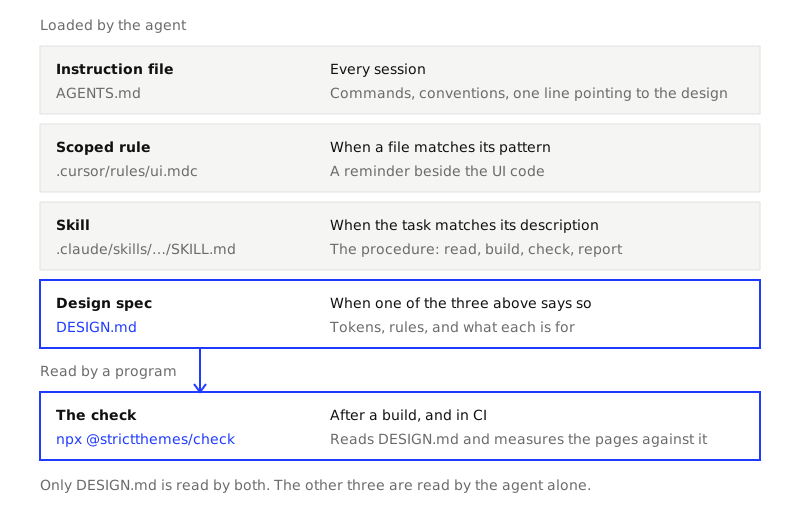
Three copies of a color list means three chances for one to be out of date, and no way to tell which is right. This guide sorts the files by one question: when is each one read, and by what.
Four kinds of file
An instruction file the agent always loads. AGENTS.md is the common name: plain Markdown in the repository's root, with no required fields. Its own site describes it as "a README for agents" and lists Codex, Cursor and GitHub Copilot's coding agent among the tools that read it. Where a project has several, in subfolders, the one nearest the file being edited takes precedence. Some tools read a file with a name of their own in place of it. It is the same kind of file: your agent's instruction file (such as AGENTS.md).
Editor rules scoped by path. Cursor keeps project rules in .cursor/rules, as .mdc files. Each has front matter with three fields, description, globs and alwaysApply, which decide when it applies: in every session, when the agent judges the description relevant, when a file matching the pattern is in play, or only when you mention the rule by name. Cursor's documentation says an applied rule is put at the start of the model's context. A plain .md file in that folder is ignored.
Skills that load on demand. A skill is a folder holding a SKILL.md, which starts with a name and a description. The Agent Skills specification describes the loading in three steps: the name and description of every skill are loaded at startup, the body of one skill is loaded when a task matches its description, and any further files in the folder are read only when needed. So a skill costs a sentence until it is used.
DESIGN.md. A design spec: tokens (named colors, text styles, spacing steps, corners) in YAML front matter, rules in a strict block, and prose on what each is for. Treat it as a file an agent reads when one of the other three tells it to. It is the only one of the four that a program reads too. What is a DESIGN.md takes the file apart.
What belongs in each
| Instruction file | Scoped rule | Skill | DESIGN.md | |
|---|---|---|---|---|
| Example path | AGENTS.md |
.cursor/rules/design.mdc |
.claude/skills/<name>/SKILL.md |
DESIGN.md |
| Read when | Every session | Depends on its type: always, by description, by file pattern, or by name | Name and description at startup, body when the task matches | When another file says so, and by the check |
| Belongs in it | Build and test commands, conventions, pointers to other files | A short reminder tied to a part of the codebase | A procedure: steps, in order, with the commands | The design: values, rules, and what each is for |
| Length | As short as you can make it: every line is read in every task | Cursor's advice is under 500 lines | The specification's advice is under 500 lines, and a body under 5,000 tokens | The 23 themes in this repo run from 177 to 191 lines |
| Can anything verify it | No | No | Its front matter can be validated. Its instructions cannot | Yes: a linter checks the file, and a check measures the pages against it |
The last row is the reason design values go in DESIGN.md and nowhere else. A sentence in an instruction file is a request. You find out whether it was followed by looking. A token in DESIGN.md is data: a program can compare #1F3BFF with the color the browser drew.
The layout to use
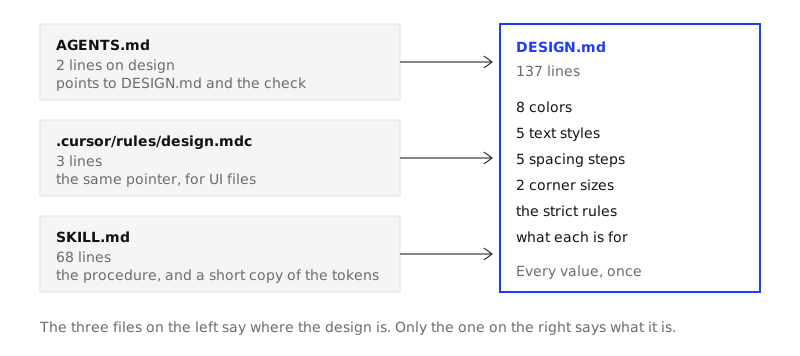
DESIGN.mdholds the design. Every color, size, step and corner, the rules, and the prose. Once.- The instruction file gets one or two lines. They point to
DESIGN.mdand name the check command. Nothing about hex values. - A skill holds the procedure. Read the spec, use the tokens, build, run the check, fix, report. It is long, and it is only loaded for UI work.
- A scoped rule is optional. If your editor has them, a few lines tied to the UI folders repeat the pointer where it is most likely to be needed.
your-project/
  AGENTS.md
  DESIGN.md
  .cursor/rules/design.mdc
  .claude/skills/strictthemes-com-design/SKILL.md
One project, four real files
To have real files to show, we generated two of the four from this site's home page, in an empty folder:
npx @strictthemes/check generate https://strictthemes.com --skill
Wrote .../DESIGN.md
Wrote .../.claude/skills/strictthemes-com-design/SKILL.md

  colors      8
  typography  5 sizes
  spacing     5 steps
  corners     2

Checked against the pages it was measured from: 100% of 2140 measured values follow it.
Make a DESIGN.md from a site you already have walks through that command. Here are the four files.
DESIGN.md
137 lines. This is the top of it:
---
version: alpha
name: "strictthemes.com"
colors:
  background: "#FFFFFF"
  primary: "#1F3BFF"
  on-primary: "#FFFFFF"
  secondary: "#F5F5F3"
  on-secondary: "#111111"
  neutral: "#6B6B6B"
  foreground: "#111111"
  border: "#E2E2E0"
...
strict:
  version: 1
  contrast: AA
  colors:
    allow: tokens
    tolerance: 0.02
...
The instruction file
This one we wrote by hand, and it is the whole design section. Copy it and change the build command:
## Design

- The design is in `DESIGN.md`: colors, text sizes, spacing, corners and the rules. Read all of it before you write or change UI. Do not edit it to make a page pass.
- After UI work, run `npm run build`, then `npx @strictthemes/check --dist dist`. The work is done when the last line starts with `Passed`.
Two lines, read in every session, including the ones that only touch the database. That is why the values themselves are not here.
A scoped rule
Also written by hand, in the format Cursor's documentation gives. Save it as .cursor/rules/design.mdc:
---
description: Design rules for UI files
globs: src/**/*.tsx, src/**/*.css
alwaysApply: false
---

- UI follows `DESIGN.md` in the project root. Read it before editing these files.
- Use the theme's classes (`bg-primary`, `text-h1`, `p-4`). No hex values and no palette classes such as `bg-blue-500`.
- Before you finish, build and run `npx @strictthemes/check --dist dist`.
With a pattern and alwaysApply: false, the rule applies when a matching file is in play. Several patterns are separated by commas.
The skill
The generated SKILL.md is 68 lines and 701 words. Its front matter is what the agent sees at startup:
---
name: strictthemes-com-design
description: "Build UI that matches strictthemes.com (https://strictthemes.com): its colors, type, spacing and corners, as written in DESIGN.md. Use it whenever you add or change a page, a section or a component in this project. It names the tokens, says what is not allowed, and checks the result with Strict Check."
---
The description says what the skill does and when to use it, which is how an agent decides to load it. The body is a procedure. It opens with what to do first:
- Read
DESIGN.mdin full. Its front matter is the tokens; its sections say how they are used.- Look at how the project names the tokens in code (CSS variables, Tailwind classes) and use those names, not raw values.
It lists the tokens in short, then says which copy wins:
If this list and
DESIGN.mddiffer, the spec is right.
And it ends with the check, and with a rule about honesty:
Fix every error it lists by using a value the spec allows, and run it again until the last line starts with
Passed. Do not mark codestrict-ignoreto get there.
Give your coding agent a design skill covers writing and installing one.
What "can be verified" looks like
The same DESIGN.md that the agent read is the input of the check. In the generated folder:
npx @strictthemes/check --spec DESIGN.md --url https://strictthemes.com --no-source
Strict Check: strictthemes.com

Rendered pages: / in light mode at 1280px and 375px, also on hover and focus
  colors        1212 checked  all on theme
  spacing        917 checked  all on theme
  typography    2870 checked  all on theme
  corners        162 checked  all on theme
  contrast       574 checked  all on theme
  tells          584 checked  all on theme
  layout           2 checked  all on theme
  states         192 checked  all on theme

Not checked, on request: 47 elements on the pages marked data-strict-ignore.

Passed: 100% of 6513 measured values follow the theme. 0 errors, 0 warnings.
No instruction file can produce that line. A rule written as prose can be read and agreed with and still not followed. This is also the argument for the one-line pointer: the instruction file does not need to repeat the spacing scale, because the check will catch a 12px gap whether or not the agent remembered.
How long each file is here
We counted the lines and words of the real files, with wc and a short script over the repo:
| File | Lines | Words |
|---|---|---|
The 23 theme DESIGN.md files |
177 to 191, median 184 | 650 to 917, median 771 |
DESIGN.md generated from this site's home page |
137 | 587 |
| The skill generated with it | 68 | 701 |
skills/strict-check/SKILL.md in the repo |
135 | 1,293 |
The 23 theme skills in skills/ |
117 to 165, median 135 | 3,868 to 7,952, median 5,212 |
| The design section of the instruction file above | 2 | 57 |
Read the fifth row as a warning as much as a guide. The theme skills are long because each carries the layout notes for five pages: where the header goes, how a price is set, which button variant does what. At 5,212 words in the middle one, they are long for a skill. That cost is paid only in a session that builds UI in that theme. The same text in an instruction file would be paid in every session.
Where this goes wrong
- A pointer is not a guarantee. "Read
DESIGN.md" is still prose. An agent can skip it. The check is the part that does not depend on being obeyed, so run it in CI too: see Strict Check in CI. - The skill has a copy of the tokens. The generated skill lists the colors and sizes "in short". Change
DESIGN.mdand that list is stale. The skill says the spec wins, and generating it again with--forcereplaces it. - Skill folders differ by tool. The command writes to
.claude/skills/. For a tool that looks elsewhere,--skill-out <file>writes the same text where you say. We have not tested which folder each tool reads. - Not every tool has every kind. Path-scoped rules are described here as Cursor documents them. If your tool has only an instruction file, the two-line section above still works, and the skill's text can be pasted under it at the cost of loading it every time.
- The check covers numbers, not sentences. The repo's own check skill says it:
bg-primaryon a whole panel "passes the check and can still break the theme". What a color is for stays in the prose ofDESIGN.md, and a person still reviews it.
Next
- What is a DESIGN.md, and what goes in one: the file's parts, and a small one to copy.
- Give your coding agent a design skill: the skill in detail.
- The themes: each theme's page links its
DESIGN.mdand its skill, and the repo has all the skills quoted here.