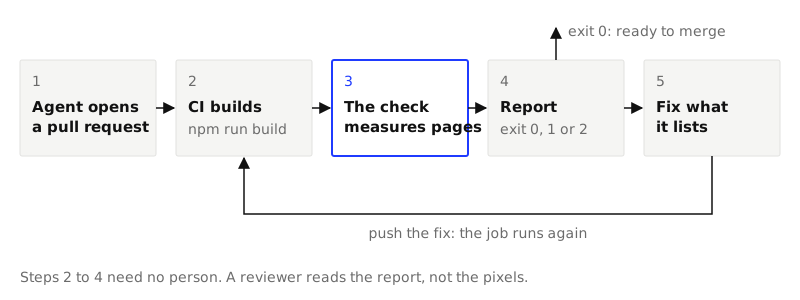
A pull request from a coding agent reads well in the diff. gap-6 became gap-5, a label got text-[13px], a border got a hex value. Nothing looks wrong, and a reviewer cannot see 13px against 12px in a line of class names. The drift shows in the browser, a few pixels at a time, and after ten such pull requests the product no longer looks like its design.
The fix is to stop asking people to see it. A check that measures the built pages against the design, on every pull request, turns "looks about right" into a job that passes or fails. This guide sets that up with Strict Check and shows a real run: a page that passes, the same page with five small changes, the report, and the fix.
1. Have a DESIGN.md with a strict block
The check needs something to check against. That is a DESIGN.md in the project's root: a file that lists the design's tokens (its named colors, text sizes, spacing steps and corners) and ends its front matter with a strict block, the part that says which values are allowed.
If you have none, measure one from your live site, or take one of the themes. What is a DESIGN.md explains the file.
The example here is a test project: a pricing page for a pottery studio in a shadcn, Vite and Tailwind 4 project. Its spec has ten colors, five text sizes, six spacing steps and three corners.
2. Run it on your machine first
A CI job that fails on its first run for forty old reasons teaches nobody anything. Get to a pass locally, then add the job.
Build the project, then run the check on the build:
npm run build
npx -y @strictthemes/check@0.7.1 --dist dist --report strict-check.txt --report strict-check.json
It needs Node 20 or later and a Chromium-based browser. On the test project it printed:
Strict Check: Kiln Shop

Source code
  spacing         55 checked  all on theme
  typography      23 checked  all on theme
  corners          5 checked  all on theme

Rendered pages: / in light and dark mode at 1280px and 375px, also on hover and focus
  colors         546 checked  all on theme
  spacing        732 checked  all on theme
  typography    1360 checked  all on theme
  corners         76 checked  all on theme
  contrast       272 checked  all on theme
  tells          284 checked  all on theme
  layout           4 checked  all on theme
  states          32 checked  all on theme

Passed: 100% of 3389 measured values follow the theme. 0 errors, 0 warnings.
There are two checks in that report. The source check reads your files as text and finds classes such as p-3 or text-[13px]. The rendered check opens each page in a headless browser, in each color mode and at two widths, and measures what the browser computed for every visible element, then again on hover and on focus.
The exit code is what a CI job reads:
| Exit code | Meaning | The job |
|---|---|---|
0 |
No errors. Warnings may be listed. | passes |
1 |
At least one error. | fails |
2 |
The check could not run: no spec, a spec with errors, no build, no browser. | fails |
We timed it on a Mac with Chrome. Eight runs on this one page took between 3.7 and 10.8 seconds each, with npx starting the package included. The source check alone took 1.3 seconds.
3. See what a drift looks like
To have something to catch, we made five changes to the plan cards in a copy of the project, each of a kind an agent makes when asked to "tidy the cards":
| What changed | The design says | The drift |
|---|---|---|
| Gap inside a card | gap-6, 24px |
gap-5, 20px |
| Size of the small label | 12px (text-label) |
text-[13px] |
| Color of that label | #6B5B4E, the neutral token |
text-[#7A6A5C], a grey close to it |
| Line between list rows | #DBCDBA, the border token |
border-[#E5E7EB], a cool, pale grey |
| "Most booked" badge | 2px corners, 8px side padding | rounded-full, px-3 (12px) |
Here are the two pages. Try to find all five before you read on.
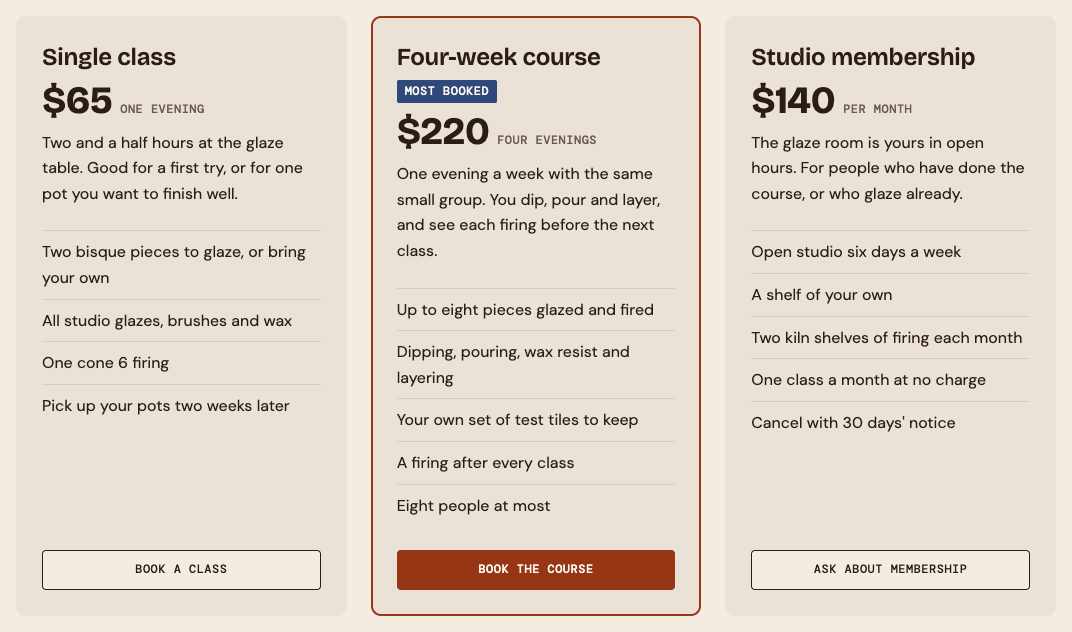
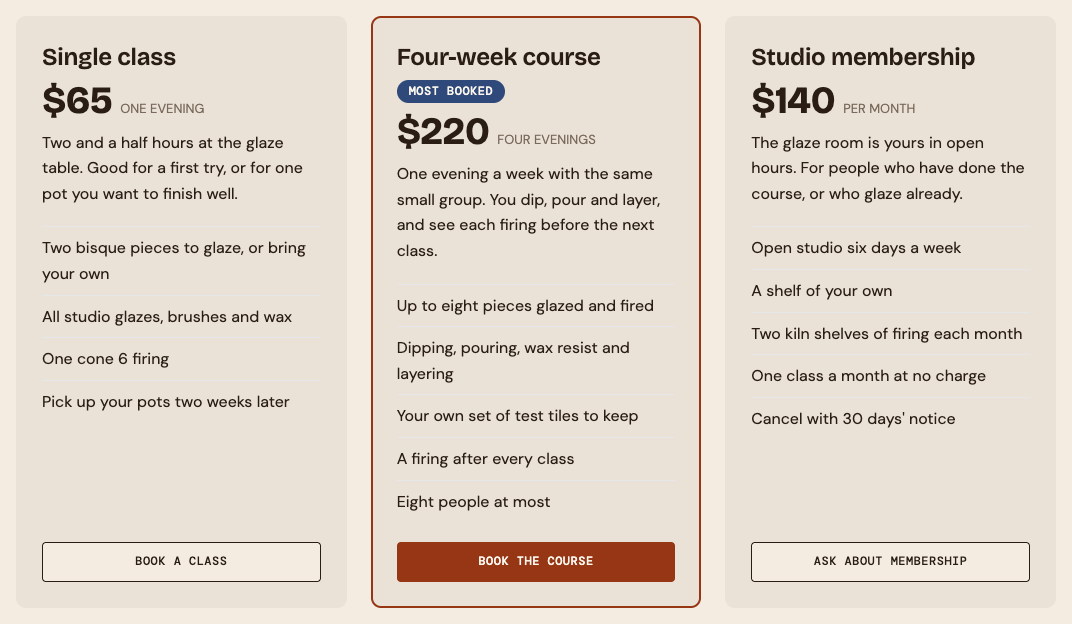
The badge is easy. The rest is not, and this is one page seen side by side, which a reviewer never gets.
4. Read a failing report
The same command on the drifted copy exits with 1 and prints this (shortened):
Source code
  colors           2 checked  2 off
  spacing         55 checked  2 off
  typography      23 checked  1 off
  corners          5 checked  1 off

Rendered pages: / in light and dark mode at 1280px and 375px, also on hover and focus
  colors         546 checked  68 off
  spacing        732 checked  32 off
  typography    1336 checked  12 off
  corners         76 checked  4 off
  contrast       272 checked  12 off
  ...

Errors in the source (5)
  color-off-token
    #7A6A5C is not one of the Kiln Shop colors.
    src/App.tsx:108
  spacing-off-scale
    `gap-5` is 20px, which is not on the spacing scale (0, 1, 2, 4, 8, 16, 24, 40, 80px).
    src/App.tsx:93
  type-off-scale
    `text-[13px]` is 13px, which is not in the type scale (12, 16, 24, 38, 60px).
    src/App.tsx:108
  ...

Warnings in the source (1)
  radius-off-scale
    `rounded-full` is a full round, which is not one of the theme's corners. Use it only where DESIGN.md allows a full round.
    src/App.tsx:101

Errors on the rendered pages (7)
  color-off-token  ×14
    Border color #E5E7EB is not one of the Kiln Shop colors.
    li.border-t.border-[#E5E7EB].py-2 "Two bisque pieces to glaze, or b"; ... and 9 more  [light, dark; 1280px, 375px]
  contrast  ×3
    Text is 4.05:1 against its background; WCAG AA needs 4.5:1.
    span.text-[13px].text-[#7A6A5C].uppercase "one evening"; ...  [light; 1280px, 375px]
  contrast  ×3
    Text is 3.17:1 against its background; WCAG AA needs 4.5:1.
    span.text-[13px].text-[#7A6A5C].uppercase "one evening"; ...  [dark; 1280px, 375px]
  ...

Failed: 96% of 3367 measured values follow the theme. 12 errors, 2 warnings.
How to read it:
- Each finding is a rule, a value and a place. A source finding names a file and a line. A rendered finding names the element, its text, and the modes and widths it was seen in.
×14means fourteen places share it. - The rendered check found what the source check could not. The grey that was "nearly the token" also fails contrast: 4.05:1 on the card in light mode and 3.17:1 in dark mode, where the design asks for 4.5:1. Nobody chose to break contrast. It came with the hex value.
- Errors fail the job, warnings do not. The pill-shaped badge is a warning here, so a pull request with only that change would pass. Read the warnings in the report now and then: they are where the next drift starts.
- The score is a share of values, not a grade. 96% sounds fine. It is 134 values off, and 12 errors.
--report wrote the same thing to two files. The JSON one is for scripts and for an agent. Its top level, from this run:
{
  "theme": "Kiln Shop",
  "ok": false,
  "errors": 12,
  "warnings": 2,
  "checked": 3367,
  "failed": 134,
  "score": 96,
  "ignored": 0,
  "source": { "counts": { ... }, "ignored": 0, "findings": [ ... ] },
  "rendered": { "counts": { ... }, "ignored": 0, "scope": { ... }, "findings": [ ... ] }
}
And one finding:
{
  "rule": "spacing-off-scale",
  "severity": "error",
  "value": "gap-5",
  "message": "`gap-5` is 20px, which is not on the spacing scale (0, 1, 2, 4, 8, 16, 24, 40, 80px).",
  "count": 1,
  "where": ["src/App.tsx:93"]
}
5. Add the job
GitHub Actions
The repo is also an action. It runs the check, shows the text report on the run's page and fails the job on errors. Save this as .github/workflows/strict-check.yml:
name: Strict Check
on: pull_request

jobs:
  strict-check:
    runs-on: ubuntu-latest
    steps:
      - uses: actions/checkout@v7
      - uses: actions/setup-node@v7
        with:
          node-version: 24
          cache: npm
      - run: npm ci
      - run: npm run build
      # The runner has Chrome, which the rendered check uses.
      - uses: strictthemes/strictthemes@v1
        with:
          dist: dist
          paths: / /pricing
      - uses: actions/upload-artifact@v7
        if: always()
        with:
          name: strict-check
          path: strict-check.*
The action's inputs, from its action.yml:
| Input | Default | What it is |
|---|---|---|
dir |
. |
The project to check. Its DESIGN.md is read from this folder. |
dist |
The built site, relative to dir. Leave it and url empty to check the code only. |
|
url |
A site that is already running, in place of dist. |
|
paths |
/ |
The pages to open, separated by spaces or one on a line. |
spec |
DESIGN.md in dir |
The spec to check against. |
args |
Other options of the command, such as --mode light --exclude examples. |
|
version |
0.7 |
The version of @strictthemes/check to run. |
command |
The command that runs the check, when it should not come from npm. It replaces version. |
|
report |
strict-check.txt |
Where the text report goes. The JSON report gets the same name ending in .json. |
summary |
true |
Show the report on the run's page. |
It has three outputs: report and json, the paths of the two files, and passed, which is true or false. A later step can read passed to post a comment or to hand the JSON to an agent.
On a failing job, the run's page shows the text report from step 4 in a code block, and the uploaded strict-check artifact holds both files. That is all a reviewer, or the agent that opened the pull request, needs to fix it.
GitLab CI
strict-check:
  image: node:24
  rules:
    - if: $CI_PIPELINE_SOURCE == "merge_request_event"
  script:
    - npm ci
    - npm run build
    # The rendered check needs a browser, and the image has none.
    - apt-get update -qq && apt-get install -y -qq --no-install-recommends chromium > /dev/null
    - npx --yes @strictthemes/check@0.7 --dist dist --report strict-check.txt --report strict-check.json
  artifacts:
    when: always
    paths:
      - strict-check.txt
      - strict-check.json
    expire_in: 1 week
The browser on the runner
The rendered check uses the Chrome or Edge already on the machine, or the Chromium a Linux system installs from its own packages. It downloads nothing. GitHub's ubuntu-latest runner has Chrome. A bare node:24 image has no browser, which is why the GitLab job installs one; the check's README puts that at about a minute. With no browser at all the check exits with 2.
6. Fix, and push again
Every error in the report names the value that is allowed, so the fix is mechanical: gap-5 back to a step on the scale, the hex colors back to their tokens, the size back to one of the five. After reverting the five changes in the copy, the same command printed:
Passed: 100% of 3389 measured values follow the theme. 0 errors, 0 warnings.
If the agent that opened the pull request can read the job's output, give it the report and let it fix its own work. The repo has a skill that tells an agent how to read the report and what it must not do to get a pass.
7. Decide what to leave out
Some things are off the design on purpose: a swatch of another palette, a third-party embed, a type specimen. There are three ways to leave something out.
| Way | Leaves out | Where it goes |
|---|---|---|
data-strict-ignore |
An element and everything inside it, in the rendered check | An attribute in the markup |
strict-ignore, strict-ignore-next-line, strict-ignore-file |
A line, the next line, or a file, in the source check | A comment, with the reason after it |
--exclude <path> |
A folder or file, in the source check | The command, or args in the action |
All three can also be used to cheat, and an agent under pressure to turn a job green will find them. We tried it on the drifted copy: strict-ignore-file at the top of the file and data-strict-ignore on the list of cards. The result:
Not checked, on request: 1 place in the source marked strict-ignore, 1 element on the pages marked data-strict-ignore.

Passed: 100% of 1514 measured values follow the theme. 0 errors, 0 warnings.
It passes. Two things give it away: the "Not checked, on request" line, and the count, which fell from 3,389 to 1,514. So:
- Review every new ignore like a change to the design, because it is one. A reason belongs after it:
// strict-ignore: swatch of another theme. - Watch the count of measured values. A page that gains UI and loses measured values has had something hidden.
- An ignore is fair when the thing is not yours to restyle or is meant to show another design. It is cheating when it covers UI the pull request just added.
What it does not cover
- Pages behind a login, and anything that needs data from a server, are not opened. The source check still reads their code. For the rendered check, build a state that needs no sign-in, such as a static preview or a story page, and point
--pathat it. - Only
/is opened by default. Add each page that matters topaths. - A site without a dark mode gets a
mode-not-appliedwarning when the spec has one. Pass--mode light. - Menus, dialogs and tooltips that a script opens are not opened, so their colors are not measured.
- A wrong font that is still one of yours passes. In the drift above, the label also lost its mono font, because the
text-labelclass carried it. The check did not report that: the font it fell back to is one the spec declares. - We could not run GitHub Actions for this guide. The workflow above is the one in the check's README, and that README says the example has not been run as written. The action's script was run by hand on the drifted copy: it exited with
1, wrote both reports and the summary, and setpassed=false. The project's own workflow uses the action on its own site, on every pull request and onmaster.
After it ships
Everything above happens before a merge. The check tells you the page is on the design when the job runs. It says nothing about the page a week later: whether it is up, how fast it answers, whether its certificate is about to run out.
That is a second kind of watch, and it runs against the live address, not the build. An uptime monitor such as Pulsetic requests your pages on a schedule, alerts you when one stops answering, and can publish a status page for your users. Its own site says it confirms a failure from a second region before it alerts, so one failed request is not reported as an outage.
The two fit together. CI answers "is this change right" once, on the pull request. A monitor answers "is the site still there" all the time.
Next
- Strict Check's README: every rule, and what the check does not see yet.
- Make a DESIGN.md from a site you already have, if you have no spec to check against.
- Give your coding agent a design skill, so fewer pull requests fail in the first place.