Your product's pages follow its DESIGN.md. Then a coding agent writes the welcome email, the receipt and the password reset, and they come out in another look: #333 text, a 14px body, a blue button nobody chose. The agent did not forget the design. It lost the route to it.
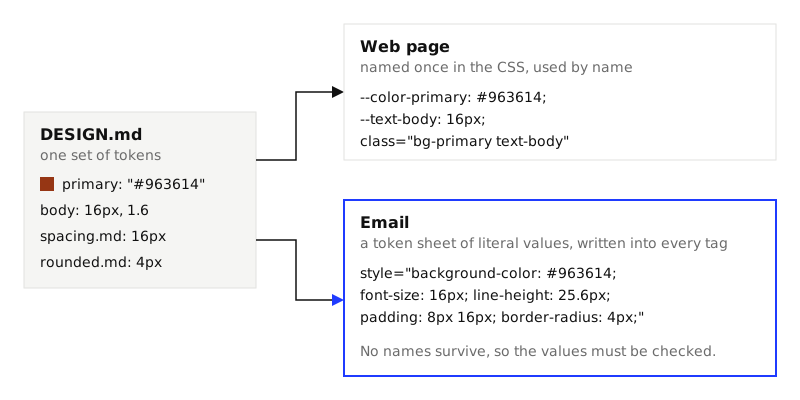
On a web page a token (a named design value, such as primary) lives in the CSS once and is used by name. Email HTML has no dependable place to keep a name. caniemail.com, which tests mail clients feature by feature, lists CSS variables as not supported in Gmail, Outlook and Yahoo Mail (its data file of 2026-09-16; several of those tests date from 2019 and 2020). So every value is typed out again in every tag, and a value typed again and again by an agent drifts.
This guide gives the agent a sheet of literal values made from the spec, builds a receipt email from it, and checks the email against the same DESIGN.md as the site.
The example uses Kiln, one of the themes in the repo, as the spec. You need Node 20 or later and Chrome.
1. Make a token sheet
An email cannot use var(--color-primary), a line height of 1.6 is safer as a length, and -0.02em is easier to get wrong than -0.76px. So resolve everything first. This script reads the spec with lintSpec from @strictthemes/spec (npm install @strictthemes/spec) and prints each token as the literal an email needs. Save it as token-sheet.mjs:
import { readFileSync } from 'node:fs'
import { lintSpec, tokensForMode, fontRoles } from '@strictthemes/spec'

const { spec, ok } = lintSpec(readFileSync(process.argv[2] ?? 'DESIGN.md', 'utf8'))
if (!ok) { console.error('The spec has errors. Run: npx @strictthemes/spec lint DESIGN.md'); process.exit(2) }

const px = (value, base = 16) => {
  const [, n, unit] = /^(-?[\d.]+)(px|rem|em)?$/.exec(String(value)) ?? []
  if (n === undefined) return String(value)
  const size = unit === 'px' ? +n : unit === 'rem' ? +n * 16 : +n * base
  return `${+size.toFixed(2)}px`
}
const mono = fontRoles(spec.typography).mono ?? ''
const stack = (family) => `'${family}', ${mono.includes(family) ? "'Courier New', Courier, monospace" : 'Arial, Helvetica, sans-serif'}`
const row = (name, value) => console.log(`  ${name.padEnd(18)}${value}`)

console.log(`TOKEN SHEET FOR EMAIL: ${spec.name}`)
const modes = Object.keys(spec.strict.modes)
console.log(`\nCOLORS${' '.repeat(14)}light${modes.map((m) => `    ${m}`).join('')}`)
for (const [name, value] of Object.entries(spec.colors))
  row(name, [value, ...modes.map((m) => tokensForMode(spec, m).colors[name])].map((v) => v.toUpperCase()).join('  '))

console.log('\nTYPE              size / line height, weight, letter spacing, font stack')
for (const [name, t] of Object.entries(spec.typography)) {
  const size = parseFloat(px(t.fontSize))
  const line = /^[\d.]+$/.test(String(t.lineHeight)) ? `${+(size * t.lineHeight).toFixed(2)}px` : px(t.lineHeight, size)
  row(name, `${size}px / ${line}, ${t.fontWeight}, ${t.letterSpacing ? px(t.letterSpacing, size) : '0'}, ${stack(t.fontFamily)}`)
}

console.log('\nSPACING')
for (const [name, value] of Object.entries(spec.spacing)) row(name, px(value))
console.log('\nCORNERS')
for (const [name, value] of Object.entries(spec.rounded)) row(name, px(value))

console.log('\nCOMPONENTS')
const typeName = (value) => /^\{typography\.(.+)\}$/.exec(String(value ?? ''))?.[1]
for (const [name, c] of Object.entries(spec.components)) {
  const type = typeName(spec.raw.components[name].typography)
  row(name, [`${c.textColor} on ${c.backgroundColor}`, type && `${type} type`, c.rounded && `corners ${c.rounded}`, c.padding && `padding ${c.padding}`].filter(Boolean).join(', '))
}
node token-sheet.mjs DESIGN.md
For Kiln it prints:
TOKEN SHEET FOR EMAIL: Kiln

COLORS              light    dark
  primary           #963614  #EC8B5E
  on-primary        #FFF6EC  #2A1206
  secondary         #2A1D14  #F1E6D8
  on-secondary      #FBF6EE  #2A1D14
  tertiary          #2F4A7A  #9DB4E6
  on-tertiary       #FBF6EE  #14203A
  neutral           #6B5B4E  #B5A493
  background        #F4ECE1  #1A130E
  surface           #FBF6EE  #241A13
  foreground        #2A1D14  #F1E6D8
  border            #DBCDBA  #3B2D22
  error             #B3122D  #FF8E99
  success           #2F6B3A  #7FC98A
  glaze-pale        #F2EADC  #F2EADC
  glaze-dark        #5A4132  #5A4132

TYPE              size / line height, weight, letter spacing, font stack
  display           60px / 60px, 700, -1.8px, 'Bricolage Grotesque', Arial, Helvetica, sans-serif
  h1                38px / 41.8px, 700, -0.76px, 'Bricolage Grotesque', Arial, Helvetica, sans-serif
  h2                24px / 30px, 600, -0.24px, 'Bricolage Grotesque', Arial, Helvetica, sans-serif
  body              16px / 25.6px, 400, 0, 'DM Sans', Arial, Helvetica, sans-serif
  label             12px / 15.6px, 500, 0.48px, 'DM Mono', 'Courier New', Courier, monospace

SPACING
  xs                4px
  sm                8px
  md                16px
  lg                24px
  xl                40px
  2xl               80px

CORNERS
  sm                2px
  md                4px
  lg                10px

COMPONENTS
  button-primary    #FFF6EC on #963614, label type, corners 4px, padding 8px 16px
  button-secondary  #FBF6EE on #2A1D14, label type, corners 4px, padding 8px 16px
  badge             #FBF6EE on #2F4A7A, label type, corners 2px, padding 4px 8px
  card              #2A1D14 on #FBF6EE, corners 10px, padding 24px
  page              #2A1D14 on #F4ECE1, body type
  caption           #6B5B4E on #FBF6EE, label type
Three things changed on the way from the spec. The body's line height of 1.6 became 25.6px. The label's letter spacing of 0.04em became 0.48px. And each font got fallbacks, because the brand font may never load: caniemail lists @font-face, the rule that loads a web font, as supported in Apple Mail and not supported in Gmail. Design the email to look right in the fallback. The script picks Arial for everything and Courier New for the font the spec uses as its monospace. Change those two strings if your type needs a serif.
2. Write the email from the sheet
Give the agent the sheet and the instruction at the end of this guide. Here is the receipt it should arrive at: 81 lines, 29 style attributes, no value that is not on the sheet.
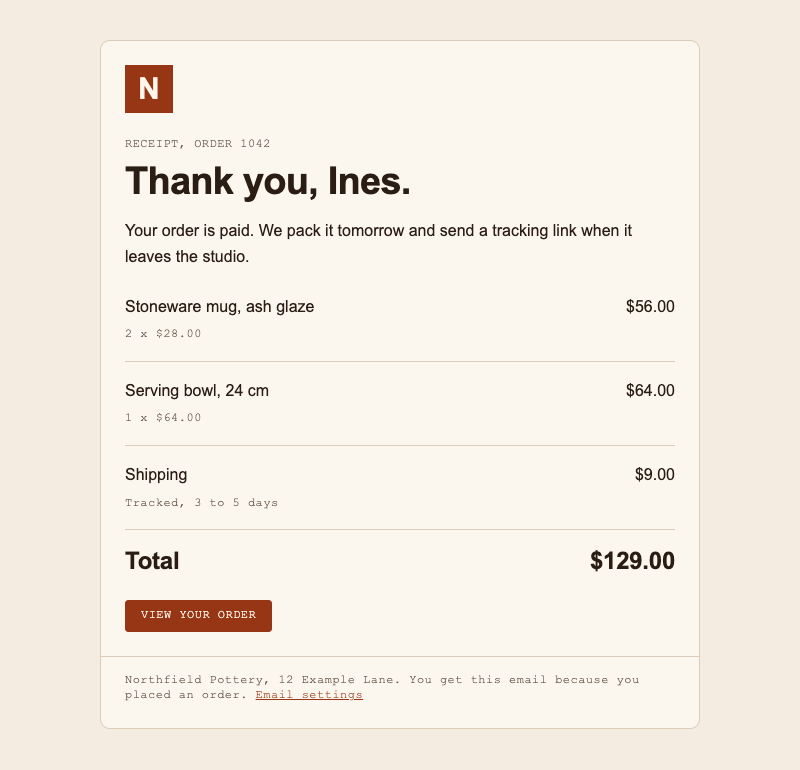
The rules it follows, with the reason for each:
- Tables for layout. Nested
tableelements withrole="presentation", which tells a screen reader the table is not data. caniemail listsdisplay: flexas not supported in Outlook for Windows (it tests the versions up to 2019). - Every style inline. A
styleelement in the head is not dependable: caniemail lists it as partly supported in Gmail. The one thing this email keeps in the head is its dark mode, in step 5. - Spacing as padding on table cells, in steps from the sheet: 24px inside the card, 16px between order lines, 40px above and below the card.
- A button made of text. A "bulletproof" button is a link with a background color, not a picture of a button, so it is there when pictures are not.
- Alt text on every image. The logo is
alt="Northfield Pottery". A reader may see the email before its pictures, or without them. - A plain-text part. An email can carry the same message twice, as HTML and as plain text, and the reader's client picks one. Write the text version by hand from the same content: the lines, the total, both links as full addresses.
The button in full:
<td class="button" bgcolor="#963614" style="background-color: #963614; border-radius: 4px;">
  <a href="https://example.com/orders/1042" style="display: inline-block; padding: 8px 16px; font-family: 'DM Mono', 'Courier New', Courier, monospace; font-size: 12px; line-height: 15.6px; font-weight: 500; letter-spacing: 0.48px; color: #FFF6EC; text-decoration: none; background-color: #963614; border-radius: 4px;">VIEW YOUR ORDER</a>
</td>
Every number in it is a row of the sheet: button-primary, label, sm, md, the md corner. The color is stated on the cell as well as on the link, so a client that drops one keeps the other.
3. Check it against the spec
Strict Check does not know about email. It knows a folder with a page in it. Put the email there as index.html, beside its image and the DESIGN.md:
npx -y @strictthemes/check@0.7.1 --dist .
The first draft, which used the classic fixed width="600" table, got this:
Strict Check: Kiln

Source code
  colors           1 checked  1 off
  typography      13 checked  all on theme

Rendered pages: / in light and dark mode at 1280px and 375px, also on hover and focus
  colors          62 checked  2 off
  spacing         82 checked  all on theme
  typography     170 checked  all on theme
  corners          6 checked  all on theme
  contrast        34 checked  all on theme
  tells           34 checked  all on theme
  layout           2 checked  1 off
  states           4 checked  all on theme

Warnings in the source (1)
  color-hard-coded
    #963614 is a theme color written out by hand, so it will not change with the color mode. Use the theme's class or variable for it.
    index.html:52

Errors on the rendered pages (1)
  horizontal-scroll
    The page scrolls sideways: its content is 632px wide in a 375px window.
    p.quiet "Northfield Pottery, 12 Example L"  [light; 375px]

Warnings on the rendered pages (1)
  mode-not-applied
    The page looks the same in dark mode: its background is still #F4ECE1. The check sets a `dark` class on <html> and the browser's color scheme. If the page has no dark mode, pass --mode light.
    the page  [dark; 1280px, 375px]

Failed: 99% of 408 measured values follow the theme. 1 error, 2 warnings.
Three findings, three different answers.
The error is real. A 600px table does not fit a 375px phone window. The fix is a fluid card: width="100%" with style="max-width: 600px".
The source warning is web advice. The source check reads files as text. In this file it counted 14 values: 13 under typography and one color, the bgcolor attribute on the button's cell. The counts stay the same when the colors, sizes and paddings inside the style attributes are wrong, as the next section shows, and its advice to use a variable does not fit email. Pass --no-source for an email.
The dark warning is true and is step 5. Until then, --mode light.
After the width fix:
npx -y @strictthemes/check@0.7.1 --dist . --no-source --mode light
Rendered pages: / in light mode at 1280px and 375px, also on hover and focus
  colors          60 checked  all on theme
  spacing         82 checked  all on theme
  typography     170 checked  all on theme
  ...
Passed: 100% of 392 measured values follow the theme. 0 errors, 0 warnings.
The rendered check is the one that matters here. It opens the file in Chrome and measures what the browser computed for each element, so an inline style is seen like any other.
What it catches
We then made the three slips an agent typically makes in an email: #333 body text at font-size: 14px, #999 for the two small grey lines, and padding: 10px 18px on the button. The source check alone passes this file with 0 errors, and counts the same 14 values. The rendered check:
Errors on the rendered pages (6)
  color-off-token  ×2
    Text color #999999 is not one of the Kiln colors.
    p.quiet "RECEIPT, ORDER 1042"; p.quiet "Northfield Pottery, 12 Example L"  [light; 1280px, 375px]
  contrast  ×2
    Text is 2.65:1 against its background; WCAG AA needs 4.5:1.
    p.quiet "RECEIPT, ORDER 1042"; p.quiet "Northfield Pottery, 12 Example L"  [light; 1280px, 375px]
  color-off-token
    Text color #333333 is not one of the Kiln colors.
    p.ink "Your order is paid. We pack it t"  [light; 1280px, 375px]
  spacing-off-scale
    A padding of 10px is not on the spacing scale (0, 1, 2, 4, 8, 16, 24, 40, 80px).
    a "VIEW YOUR ORDER"  [light; 1280px, 375px]
  spacing-off-scale
    A padding of 18px is not on the spacing scale (0, 1, 2, 4, 8, 16, 24, 40, 80px).
    a "VIEW YOUR ORDER"  [light; 1280px, 375px]
  type-off-scale
    Text is 14px, which is not in the type scale (12, 16, 24, 38, 60px).
    p.ink "Your order is paid. We pack it t"  [light; 1280px, 375px]

Failed: 94.8% of 388 measured values follow the theme. 6 errors, 0 warnings.
Be plain about what this is. It measures the email as Chrome draws it. That is the design intent: the values you meant to send. It is not what each mail client makes of them.
4. Look at the contrast
Contrast is the ratio between the light from the text and from what is behind it. WCAG AA asks 4.5:1 for normal text. These are the receipt's four text pairs, computed with contrastRatio from @strictthemes/spec:
| Text | Tokens | Light | Dark |
|---|---|---|---|
| Body text and heading | foreground on surface |
15.20:1 | 13.84:1 |
| Receipt line, item details, footer | neutral on surface |
6.04:1 | 7.06:1 |
| Button label | on-primary on primary |
6.93:1 | 7.09:1 |
| Footer link | primary on surface |
6.89:1 | 6.83:1 |
All pass. The footer is the reason to look. It holds the text a sender has to include and would like to keep quiet: the address, why you got this, the link to stop getting it. With no stylesheet to borrow a tested grey from, the grey is typed by hand, and at 12px it gets no large-text allowance. On this card, #999999 is 2.65:1, #888888 is 3.29:1, and #767676, which just passes on white at 4.54:1, is 4.22:1 and fails. The theme's own neutral gives 6.04:1. The link a reader needs most to find should not be the faintest thing in the message.
5. Add a dark mode
A reader's device may be in dark mode, and a mail client can respond in more than one way: leave the email alone, apply the dark styles the email brings, or change the colors itself. Which client does which changes over time. We tested none of them for this guide.
What you control is the second case. The spec has dark values for every color, and the sheet lists them. Put them in one style block in the head, in a media query that applies when the reader's system asks for dark, with a class on each element that changes:
<style>
  @media (prefers-color-scheme: dark) {
    .page { background-color: #1A130E !important; }
    .card { background-color: #241A13 !important; border-color: #3B2D22 !important; }
    .ink { color: #F1E6D8 !important; }
    .quiet { color: #B5A493 !important; }
    .rule { border-color: #3B2D22 !important; }
    .link { color: #EC8B5E !important; }
    .button { background-color: #EC8B5E !important; }
    .button a { background-color: #EC8B5E !important; color: #2A1206 !important; }
  }
</style>
!important is needed because an inline style otherwise beats a rule in a style block.
In Chrome with the color scheme set to dark, the email without this block is the same picture as the light one, byte for byte. With it:
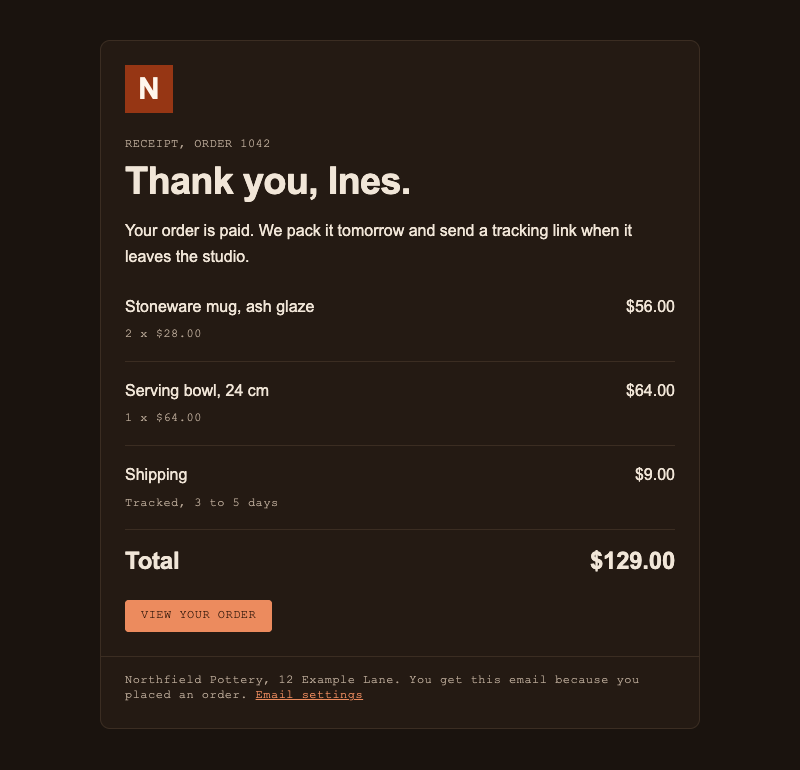
Note the button. Its fill gets lighter and its label turns dark, as the spec says. A dark mode that only swapped the page and card colors would leave the grey footer at 2.62:1 and the link at 2.30:1 on the dark card.
Now the check can run in both modes:
npx -y @strictthemes/check@0.7.1 --dist . --no-source
Rendered pages: / in light and dark mode at 1280px and 375px, also on hover and focus
  colors         122 checked  all on theme
  spacing        164 checked  all on theme
  typography     340 checked  all on theme
  corners         12 checked  all on theme
  contrast        68 checked  all on theme
  tells           68 checked  all on theme
  layout           4 checked  all on theme
  states           8 checked  all on theme

Passed: 100% of 786 measured values follow the theme. 0 errors, 0 warnings.
Where this block applies is not yours to decide. caniemail lists prefers-color-scheme as supported in Apple Mail and not supported in Gmail. Treat it as an improvement for some readers, and make sure the light version is the one you can live with everywhere.
6. Test before you send
Two things decide whether the email works, and neither can be measured from a file on your machine: how real clients draw it, and whether it arrives at all. Any pre-send test should cover how the email looks in the clients your readers use, in light and dark, whether your sending domain passes SPF, DKIM and DMARC (the DNS records that let a receiving server confirm the mail is from you), whether its content or sender trips spam filters or blacklists, and whether the links, alt text and plain-text part are in order.
One tool of this kind is Unspam. Its home page describes a free email spam checker. The page gives you a testing address that is unique to your session, you send your email to that address from the platform you really send from, and it returns a spam score from 0 to 100, which the page says is calculated from authentication (SPF, DKIM, DMARC), sender reputation, blacklists and content signals. The same page shows an accessibility scan with contrast and alt text among its checks, and says the result includes previews of the email in more than 60 clients and devices, dark mode included. We did not send the receipt through it: this is what its pages say.
Send the test from the system that will send the real email. A test sent from your own mailbox tests your mailbox.
7. What to tell the agent
Paste this with the token sheet under it:
Write this email as HTML for mail clients, using only the token sheet below.

- Layout: nested tables with role="presentation", cellpadding="0",
  cellspacing="0", border="0". No flex, no grid, no div layout.
- The card is width="100%" with max-width: 600px. No fixed pixel width
  that would not fit a phone.
- Styles: inline on every element, as literal values. No CSS variables,
  no classes for styling, no external stylesheet.
- Every color, font size, line height, letter spacing, padding and corner
  is a value from the sheet. If you need a value that is not there, stop
  and ask.
- Each text style is a whole row of TYPE: size, line height, weight,
  letter spacing and font stack together.
- Buttons: a link with a background color inside a table cell that has
  the same color, built from a COMPONENTS row. No image buttons.
- Every img has width, height and alt.
- Dark mode: one style block in the head with
  @media (prefers-color-scheme: dark), using the dark column, !important
  on each rule, and a class on each element it changes.
- Also write a plain-text version with the same content and full links.
- Then run: npx -y @strictthemes/check@0.7.1 --dist <folder> --no-source
  with the email as index.html beside DESIGN.md, and fix what it reports.
What this cannot tell you
- How a mail client draws it. A pass means the values in the file are the spec's. caniemail lists
border-radiusas not supported in Outlook for Windows, andpaddingthere as supported only on table cells. If that holds for your readers, this receipt's card and button have square corners and the button is tighter than designed. No file check shows that. - Whether the fallback font is acceptable. The check reads the first family in the stack.
'DM Sans', Arialpasses whether or not DM Sans ever loads. - What a client's own dark mode does to an email, with or without your block.
- Whether it arrives. Authentication, reputation and spam filtering are outside the file.
- Rounding. The sheet says
25.6px. An email with26pxalso passed when we tried it, so the check does not prove a line height to a tenth of a pixel. - The source check is close to blind on inline-styled email. Use the rendered one.
Check your own audience before trusting any list of client support, this one included. The caniemail entries cited here are dated, and clients change.
Next
- Contrast for non-designers: the ratio, the thresholds and how to fix a failing pair.
- Design tokens for coding agents: why an agent needs values with names.
- The spec format: the tokens and the
strictblock the sheet is made from.