Your coding agent built a page and it looks right on your machine. That proves less than it seems. The page a visitor gets comes from another computer, from a folder you did not choose, through a cache you do not control. A stylesheet that loaded from /assets/ on your machine may not exist at that address on the host.
So this guide has two halves. The first puts a built folder online. The second opens the live address in a browser and measures it against the design, with the tool that checked it locally. It also reproduces three faults that only appear after a deploy. One of them the check reports as a pass, which is worth knowing before you trust a green line.
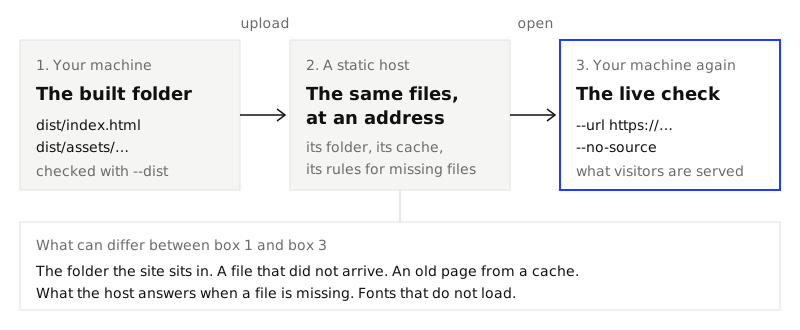
The example is a test project: a pricing page for a pottery studio, in a shadcn, Vite and Tailwind 4 project, with a DESIGN.md in its root. A DESIGN.md is the file that lists a design's colors, text sizes, spacing steps and corners, and says which values are allowed. If you have none, make one from a site you already have or take one of the themes.
1. Build, and check the built folder
Build the project, then check the build before it goes anywhere.
npm run build
npx @strictthemes/check --dist dist
On the test project the second command printed:
Strict Check: Kiln Shop

Source code
  spacing         55 checked  all on theme
  typography      23 checked  all on theme
  corners          5 checked  all on theme

Rendered pages: / in light and dark mode at 1280px and 375px, also on hover and focus
  colors         546 checked  all on theme
  spacing        732 checked  all on theme
  typography    1360 checked  all on theme
  corners         76 checked  all on theme
  contrast       272 checked  all on theme
  tells          284 checked  all on theme
  layout           4 checked  all on theme
  states          32 checked  all on theme

Passed: 100% of 3389 measured values follow the theme. 0 errors, 0 warnings.
Write down the number of measured values. Of the 3,389 here, 83 come from reading the source files and 3,306 from the rendered page. You will need 3,306 again in step 5.
Note how --dist works: it serves the folder at the root of a local address and opens /. That is one way to host the folder. Your host may do it another way.
2. Know what a static host needs
A static host is a server that sends your files as they are, with no program running behind them. It needs very little, and each thing it needs is a place where a deploy can go wrong.
A folder with index.html at its top
The host serves a folder. The file it sends for the address / is index.html. If you upload the project folder, or a zip that has dist inside it, the page ends up one level too deep.
Asset paths that fit where the folder sits
The built index.html points at its stylesheet and script. How it points at them decides where the site can live. Vite has an option for this, base. We built the test project twice, once as it was and once with one line added to vite.config.ts:
export default defineConfig({
  base: "./",
  plugins: [react(), tailwindcss()],
  ...
})
The two builds differ in three lines of index.html:
Default (base is /) |
With base: "./" |
|
|---|---|---|
| Icon | href="/vite.svg" |
href="./vite.svg" |
| Script | src="/assets/index-Cq1MVEXq.js" |
src="./assets/index-tveXzkGN.js" |
| Stylesheet | href="/assets/index-CC232Naa.css" |
href="./assets/index-BD4AKE_w.css" |
A path that starts with / is absolute: it is read from the top of the domain, wherever the page is. A path that starts with ./ is relative: it is read from the page's own folder. The absolute build works only when the site sits at the top of its domain. The relative build works there and in any subfolder. In both builds the stylesheet refers to its fonts relatively (url(./dm-sans-latin-wght-normal-Xz1IZZA0.woff2)), so the fonts follow the stylesheet.
If you know the subfolder in advance, base: "/shop/" is the third choice: absolute paths that start there.
An answer for addresses that have no file
A single-page app has one index.html and draws every route with JavaScript. The address /plans has no file behind it. A host must be told to send index.html for such addresses, a setting often called a single-page-app fallback. Without it, a visitor who reloads on /plans gets a 404. With it, a host may answer a missing stylesheet with index.html and a status of 200 as well. The local server in step 5 does. So a "200" tells you less than you would think.
A domain and HTTPS
Most hosts give you an address on their own domain first and let you connect your own later. The two can differ in exactly the way above: one puts your site at the top of a domain, another in a subfolder. Check the address your visitors will use, and check it over https://, because a page served over HTTPS has its plain http:// stylesheets and scripts blocked by the browser.
3. Put it online
Any static host has to do three things: take the contents of your built folder, serve them over HTTPS at an address, and send index.html for /. If yours is a single-page app with routes, it must also offer the fallback from step 2.
One that works by upload is static.app. Its home page describes one-click hosting for a static website: you drag an archive with your site onto the page, or point its desktop app at a folder on your computer. Its page on React hosting gives the steps: run the build, zip the files inside dist so that index.html is at the root of the zip, drag the zip onto the site, and pick a subdomain or enter a domain name. The same page says HTTPS is automatic, and that a setting called "JavaScript application" makes deep addresses such as /about work on reload. We describe this from its pages. We did not upload anything for this guide.
Making the zip is the step people get wrong. Zip from inside the folder, then list what is in it:
cd dist && zip -r ../site.zip . && cd ..
unzip -l site.zip
  Length      Date    Time    Name
---------  ---------- -----   ----
      497  11-13-2026 10:47   index.html
     1497  11-13-2026 10:47   vite.svg
        0  11-13-2026 10:47   assets/
    ...
   337382                     8 files
index.html is on the first line with no folder in front of it. That is what you want.
4. Check the live address
Now run the check against the address, from the project's folder:
npx @strictthemes/check --spec DESIGN.md --url https://your-site.example --no-source
--url opens a site that is already running, in the headless browser on your machine. --no-source skips the reading of source files, which step 1 already did. Add --path for each page that matters. Only / is opened without it.
We could not deploy the test project, so here is a real run against pages that are live: three example pages of the Kiln theme on this site, with the theme's DESIGN.md as the spec.
npx @strictthemes/check --spec DESIGN.md --url https://strictthemes.com \
  --path /themes/kiln/prompts/shop/build/ \
  --path /themes/kiln/prompts/product/build/ \
  --path /themes/kiln/prompts/basket/build/ --no-source
Strict Check: Kiln

Rendered pages: /themes/kiln/prompts/shop/build/, /themes/kiln/prompts/product/build/, /themes/kiln/prompts/basket/build/ in light and dark mode at 1280px and 375px, also on hover and focus
  colors        2410 checked  all on theme
  spacing       1382 checked  all on theme
  typography    4926 checked  all on theme
  corners        402 checked  all on theme
  contrast      1058 checked  all on theme
  tells         1086 checked  all on theme
  layout          12 checked  all on theme
  states         254 checked  all on theme

Passed: 100% of 11530 measured values follow the theme. 0 errors, 0 warnings.
A page that is not there stops the check. We asked for a path that does not exist and got one line and exit code 2, which means the check could not run:
The rendered check could not run: https://strictthemes.com/themes/kiln/prompts/pricing/build/ answered 404.
How long it takes
Timed on a Mac with Chrome, with npx starting the package included:
| What was checked | Runs | Time |
|---|---|---|
| One page on the live site (4,040 values) | 3 | 6.7 to 9.4 seconds |
| Three pages on the live site (11,530 values) | 2 | 14.7 and 13.1 seconds |
| One page at a local address (3,306 values) | 3 | 4.5 to 5.8 seconds |
Each page is loaded four times: two color modes, two widths. Over a network that is most of the difference.
5. See what a live check catches
To have deploy faults to look at, we served copies of the built test project from a local address in three faulty ways and ran the step 4 command against each. The local address stands in for a deployed one: the check does not know the difference, and neither does the browser.
First, the page as it should be. This is the base: "./" build, served from a subfolder /shop/:
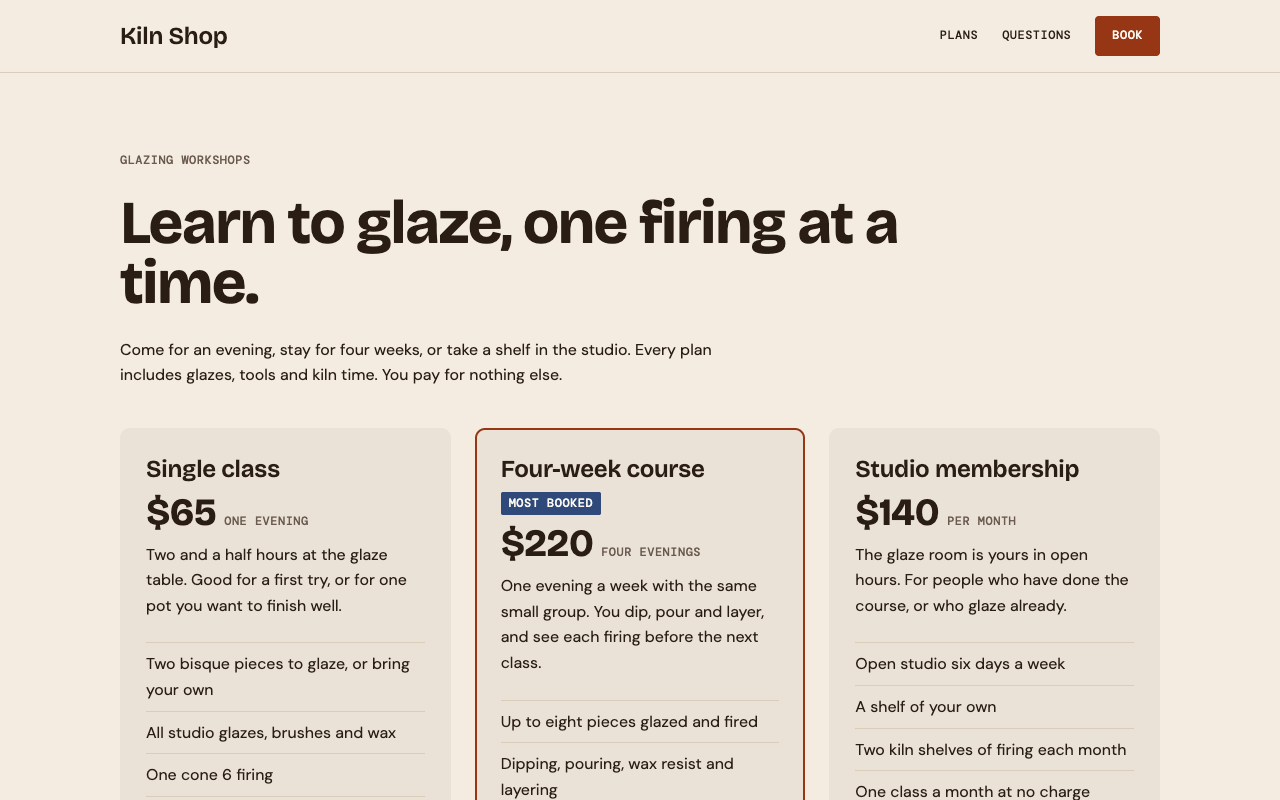
Fault 1: the default build in a subfolder
The same subfolder, with the default build. The page asks for /assets/index-CC232Naa.css at the top of the domain, gets a 404, and gets another for the script. The browser shows a white page. The check said:
Rendered pages: /shop/ in light and dark mode at 1280px and 375px, also on hover and focus
  colors           2 checked  all on theme
  spacing         16 checked  all on theme
  layout           4 checked  all on theme

Passed: 100% of 22 measured values follow the theme. 0 errors, 0 warnings.
It passed, with exit code 0. An empty page breaks no rule: there is nothing on it to be off the design. What gives it away is the count: 22 values where the local run had 3,306. This is the most important thing in this guide. Compare the count of a live check with the count of the local one, and treat a large drop as a failure.
Fault 2: the stylesheet is missing
Here the script loads and the stylesheet does not. That happens when an upload is incomplete, or when a cache still serves an old index.html that names a stylesheet from the build before. File names such as index-CC232Naa.css change with the content, so the old name is gone.
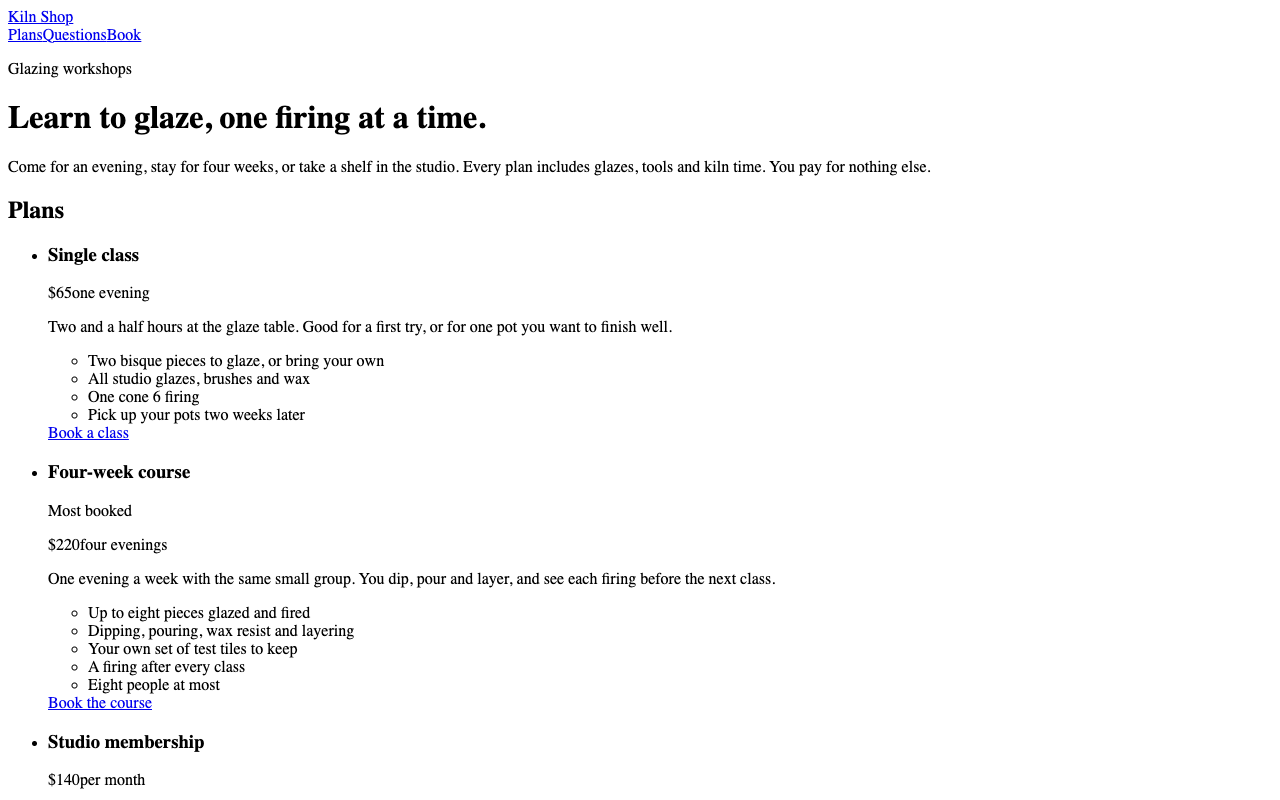
The check failed with exit code 1. Shortened:
Rendered pages: / in light and dark mode at 1280px and 375px, also on hover and focus
  colors         218 checked  216 off
  spacing        224 checked  56 off
  typography     848 checked  244 off
  ...

Errors on the rendered pages (8)
  font-undeclared  ×54
    Text is set in Times, which the theme does not declare (bricolage grotesque, dm sans, dm mono).
    a.text-h2 "Kiln Shop"; a.text-label.uppercase.underline-offset-4 "Plans"; ... and 49 more  [light, dark; 1280px, 375px]
  color-off-token  ×46
    Text color #000000 is not one of the Kiln Shop colors.
    ...
  color-off-token  ×8
    Text color #0000EE is not one of the Kiln Shop colors.
    ...
  type-off-scale  ×3
    Text is 18.72px, which is not in the type scale (12, 16, 24, 38, 60px).
    h3.text-h2 "Single class"; h3.text-h2 "Four-week course"; h3.text-h2 "Studio membership"  [light, dark; 1280px, 375px]
  ...

Failed: 70.6% of 1758 measured values follow the theme. 8 errors, 1 warning.
Times, #000000, #0000EE and 18.72px are not choices anyone made. They are the browser's own defaults for text, links and an h3. When a report is full of them, do not fix the findings one by one: the stylesheet is not arriving.
Fault 3: the font files are missing
Last, the stylesheet loads and the three font files do not. The browser falls back to fonts it has.
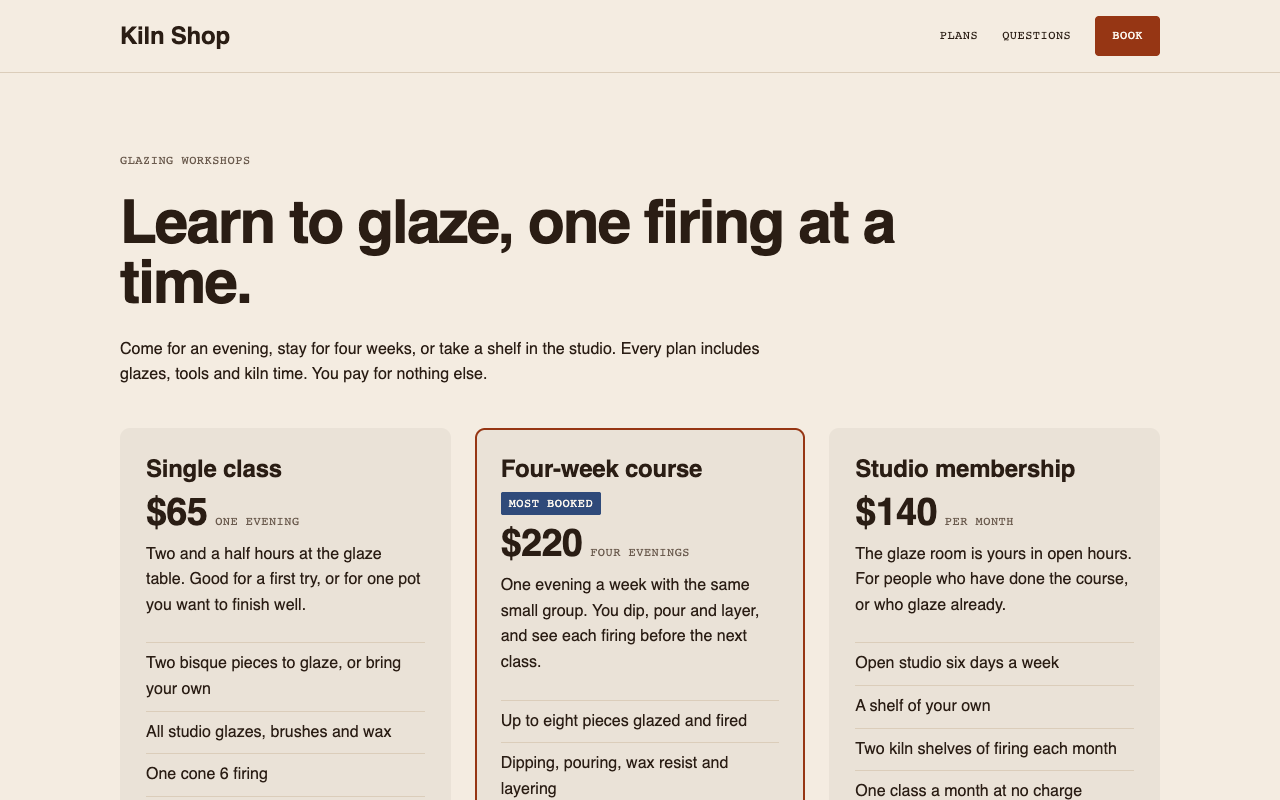
The check passed, with all 3,306 values on the theme. It reads the font the stylesheet asks for, and the stylesheet still asks for the right one. It does not know that the browser drew the text in a substitute. For fonts, look at the page yourself, or open the browser's network panel and look for font requests that failed.
The three faults, and one more
| What you see | Likely cause | What the report says |
|---|---|---|
| A white page | Absolute asset paths, site in a subfolder | Passed, but 22 values, not 3,306 |
| Black serif text, blue links | Stylesheet missing: incomplete upload, or an old page from a cache | Failed. font-undeclared Times, colors #000000 and #0000EE |
| Right layout, wrong letters | Font files missing | Passed, same count. Not detected |
| "Not found" on a deep address | No single-page-app fallback, or index.html one folder too deep |
"could not run: ... answered 404", exit code 2 |
6. Keep it checked
Each new deploy can break the address again, so run the same command after every one. The project's GitHub Action takes the live address in its url input, in place of dist, and the pages in paths:
- uses: strictthemes/strictthemes@v1
  with:
    url: https://your-site.example
    paths: / /pricing
    args: --no-source
Strict Check in CI has the whole workflow, the other inputs and how to read a failing run. We did not run this snippet on GitHub. The inputs are read from the action's action.yml, which passes url to the command as --url.
Because of fault 1, a job that only reads the exit code is not enough. Add --report live.json and compare its checked field with the number from your local run. In the experiment that field was 22 for the white page and 3,306 for the working one.
What it cannot do
- Pages behind a login are not opened. Check a public page, or a preview that needs no sign-in.
- A site that blocks headless browsers may answer the check with an error page or a challenge. We did not test against such a site.
- It checks from one place: your machine or the CI runner, once. It does not tell you what a visitor in another country gets from another cache, or whether the site is up tomorrow.
- A font that failed to load is not detected, and an empty page passes, as faults 3 and 1 show. Watch the count, and look at the page.
- It does not check links, images or forms. A broken link in a subfolder deploy is outside what it measures.
- The live example in step 4 is this site, not the test project. The faults in step 5 were reproduced at a local address, not on a host.
Next
- Keep an agent on your design: Strict Check in CI, to run the check on every pull request and after each deploy.
- Make a DESIGN.md from a site you already have, if the live site has no spec yet.
- Strict Check's README: every option, including
--url,--pathand--report.